



Only 43% of organizations have deployed passwordless authentication. One-third are stuck in pilot phases, unable to scale what they tested. Among those that have moved, 76% still carry passwords somewhere in their environment, a parallel dependency that defeats the security gains they deployed passkeys to achieve. That gap, between deploying passwordless and actually eliminating passwords, is what HYPR's 2026 Identity Assurance Report calls the Passwordless Paradox.
The paradox isn't technical. Passkeys work. FIDO2 is mature. Biometrics are common on enterprise devices like modern laptops and mobile platforms. The problem is that most organizations evaluate passwordless authentication as a security upgrade when it's actually an architectural decision; one that touches identity infrastructure, compliance posture, legacy system compatibility, and user adoption simultaneously.
This blog examines the tension between where passwordless technology stands today and where enterprise implementation breaks down, covering method selection, Zero Trust alignment, compliance pressure, implementation risks, and rollout strategy.
What Is Passwordless Authentication and What It Is Not
Passwordless authentication confirms identity without a memorized secret. Instead, it relies on possession (a registered device), inherence (biometrics), or cryptographic keys bound to a specific domain and user.
The underlying standard is FIDO2/WebAuthn, backed by Apple, Google, and Microsoft. Passkeys, the consumer-facing implementation of FIDO2, create unique, phishing-resistant credentials tied to a specific domain. They cannot be replayed, intercepted, or transferred.
Passwordless is not simply removing the password field and adding SMS OTP. Text-based one-time passwords remain vulnerable to SIM-swapping, a vector that compromised accounts at MGM Resorts, Twilio, and Coinbase in recent years. Replacing passwords with SMS OTPs shifts the attack surface without eliminating it. The distinction between phishing-resistant passwordless and merely password-alternative matters when regulators and auditors come knocking.
Verizon's 2024 Data Breach Investigations Report found that stolen credentials are involved in over 80% of hacking-related breaches. IBM's Cost of a Data Breach Report 2025 puts the average breach cost at $4.4 million, with credential-based incidents taking 261 days to contain. Those numbers reframe passwordless authentication from a UX improvement into a financial risk decision.
The Passwordless Paradox: Why 57% of Organizations Haven't Deployed It
The HYPR 2026 data is counterintuitive: organizations that understand the risk of passwords are not the ones moving fastest to eliminate them. The gap exists for three reasons most vendor content ignores.
1.Legacy systems don't support modern auth protocols
Enterprise environments are rarely greenfield. Applications built on LDAP, SAML 1.1, or proprietary session management often can't accept FIDO2 assertions without middleware or full refactoring. The more complex the application portfolio, the longer the migration timeline.
2.Identity infrastructure fragmentation slows decisions
Many enterprises run multiple Identity Providers, one per business unit, acquisition, or geography. Deploying passwordless across a fragmented IdP landscape requires federation decisions that touch access governance, directory synchronization, and session policy consistency.
3.User adoption is treated as an afterthought
The average corporate user manages 87 passwords, according to LastPass enterprise research. Replacing years of muscle memory built around password managers and browser autofill requires change management investment that most IT organizations underestimate until rollout begins.
Scope the implementation carefully before committing to a timeline that your infrastructure and culture can't support.
Passkeys vs. Biometrics vs. Magic Links: Which Method Fits Which Use Case
Not all passwordless methods carry the same security profile. Conflating them during evaluation leads to mismatched deployments.
Passkeys (FIDO2/WebAuthn)
Microsoft reports passkey sign-ins complete 3x faster than passwords. The FIDO Alliance reports 15 billion passkey-enabled accounts globally as of 2025, with 1 billion active users. Passkeys are the right method for any enterprise scenario requiring both phishing resistance and scalability.
Biometric Authentication
Biometrics (Face ID, Windows Hello, fingerprint) are the unlock mechanism for a passkey, not a standalone authentication method. When a user authenticates, the browser surfaces a biometric prompt; the device verifies it locally, unlocks the stored private key, signs the server's challenge, and returns a cryptographic assertion. The biometric never leaves the device. Standalone biometric authentication, where the biometric is transmitted to a server, introduces privacy exposure and creates a permanent credential that can't be rotated. A password can be reset; a fingerprint cannot.
Magic Links
Magic links send a time-limited URL to a verified email address. They eliminate passwords and deploy easily without FIDO2 integration. Their weakness is the email account: if it's compromised, the magic link adds no protection. Use them for low-sensitivity, infrequent-access workflows like vendor portals, survey tools, and one-time document access. Not for core systems, privileged access, or regulated environments.
SMS OTP: The Method to Retire
SMS one-time passwords are widely deployed, but shouldn't be treated as true passwordless authentication in any compliance-sensitive context. NIST SP 800-63B restricted SMS OTP for high-assurance scenarios due to SIM-swapping vulnerabilities. The carrier network is not an authentication boundary your security team controls.
For privileged access, regulated data, and customer-facing financial or healthcare workflows, passkeys are the floor. For internal productivity tools and low-sensitivity portals, magic links are an acceptable stepping stone.
Where Passwordless Aligns With Zero Trust Architecture
Zero Trust means never trust, always verify. Passwords conflict with that principle: they're static shared secrets that verify knowledge, not possession or identity.
Passkeys produce a fresh cryptographic signature per authentication event, tied to a specific device and domain, verified without any shared secret crossing the network. That maps directly to Zero Trust's core requirements: continuous verification, minimal implicit trust, and least-privilege access.
JP Morgan and Bank of America are accelerating passwordless deployment alongside their Zero Trust programs because phishing-resistant authentication is a prerequisite for Zero Trust to function, not a complementary initiative.
Plan passwordless and Zero Trust together. A Zero Trust initiative that retains password-based authentication at the identity perimeter has an unresolved gap at its foundation. For organizations pursuing cyber insurance renewals or enterprise customer security audits, that gap is increasingly the finding that delays approval or raises premiums.
Still running Zero Trust on a foundation that uses passwords?
TenUp can help identify where password-based authentication is exposing your architecture and design a phased rollout to close it.
Regulatory and Compliance Signals Driving Adoption
Regulatory pressure is moving passwordless authentication from best practice to requirement.
NIST SP 800-63B classifies many FIDO2‑based authenticators (e.g., hardware security keys) as AAL3, provided they meet the required protection profiles and are not software‑only implementations. For federal contractors under FedRAMP, meeting AAL3 is moving from optional to expected. CISA explicitly recommends phishing-resistant MFA, passkeys, not SMS OTP, as the standard for critical infrastructure.
For healthcare organizations, HIPAA's Security Rule requires access controls and audit trails that passkeys satisfy more cleanly than shared passwords, particularly for workforce authentication to PHI systems. PCI-DSS 4.0, mandatory since 2024, tightens MFA requirements for cardholder data environments, making SMS OTP less suitable for high‑risk scenarios and encouraging phishing‑resistant methods such as FIDO2.
The compliance case extends beyond legal obligation. Cyber insurance underwriters are tying premiums to MFA posture, and enterprise procurement teams in regulated sectors are adding authentication requirements to vendor security questionnaires. Passwordless authentication is becoming a deal qualification criterion.
The Real Implementation Risks Enterprises Must Plan For
Most vendors describe passwordless implementation as straightforward. At enterprise scale, it isn't. The technology is mature. The integration, governance, and operational gaps are where projects stall.
Device dependency creates recovery complexity
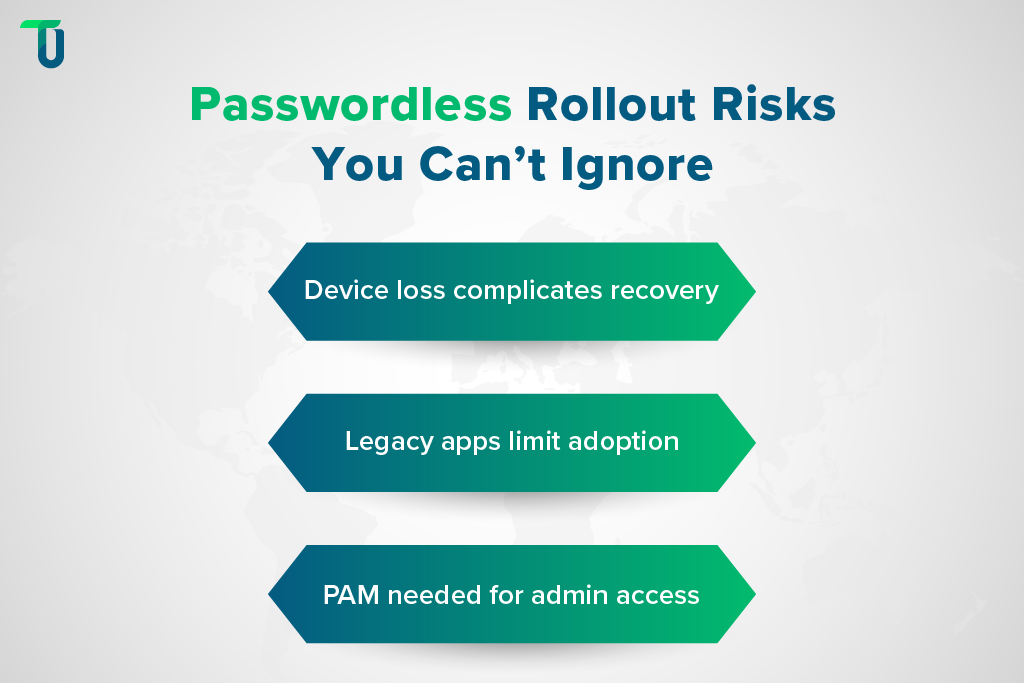
Passkeys are bound to registered devices. When a user loses their phone or transitions to a new laptop, the recovery workflow must be designed to avoid creating a password-equivalent backdoor. Recovery codes, backup devices, and supervisor-verified re-enrollment are all viable, but each requires process design and help desk training before rollout, not after.
Application portfolio heterogeneity is underestimated
Enterprises with 50+ applications rarely find all of them support FIDO2 natively. Modern web apps typically support WebAuthn with configuration. Legacy desktop apps, VPN clients, mainframe terminals, and custom internal tools often don't. An inventory audit before implementation reveals which applications need middleware, which need refactoring, and which need temporary exemptions with compensating controls.
PAM integration must be addressed separately
Standard passkey deployment covers end-user authentication. Privileged accounts like domain admins, database administrators, and cloud console access require PAM-level controls beyond FIDO2. Organizations that deploy passkeys for the general workforce and ignore PAM leave their most sensitive access paths protected only by passwords or shared credentials.
TenUp's Take: The most common reason passwordless pilots fail to reach production isn't the authentication technology; it's the absence of a device lifecycle and recovery workflow help desk teams can execute consistently. Build that workflow before you build the authentication layer.
How to Build a Passwordless Rollout Strategy That Scales
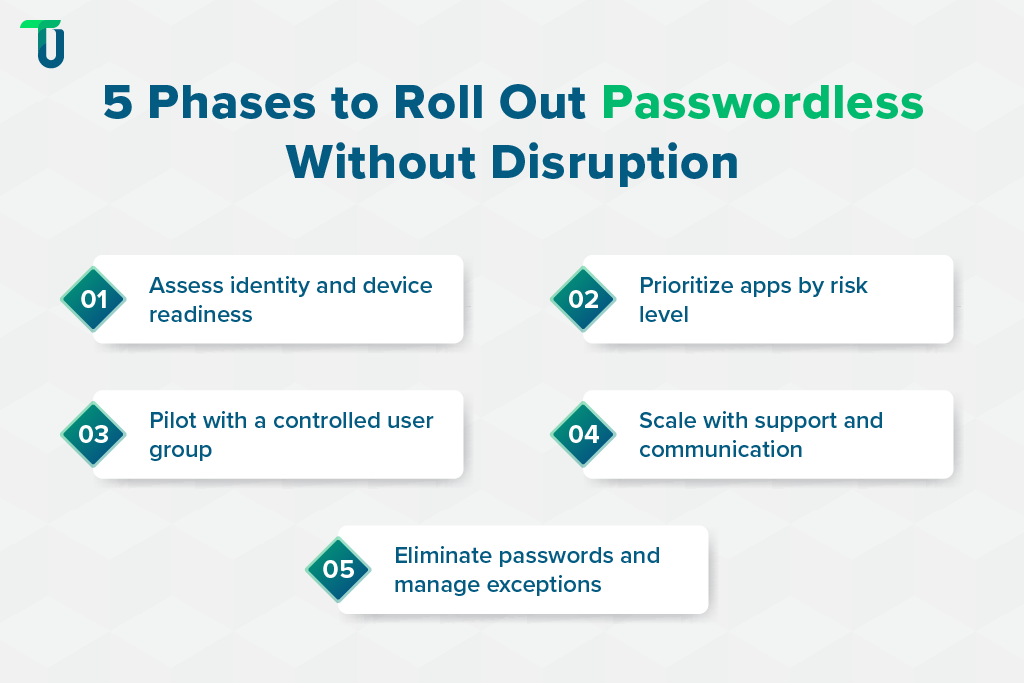
Big-bang deployment across all applications and users simultaneously produces adoption resistance and operational disruption. A phased, risk-tiered approach is the only one that reaches production.
Phase 1: Identity infrastructure assessment
Audit your IdP landscape, application authentication protocols, and device management coverage (MDM/UEM). Flag applications that will require integration work. This phase produces the real implementation timeline, not the vendor's estimate.
Phase 2: Tier your application portfolio by risk
High-sensitivity systems, like financial platforms, EHR systems, and privileged admin consoles, get passkeys first. Internal productivity tools and intranet sites follow in Phase 3, or run on magic links as an interim.
Phase 3: Pilot with a defined user cohort
Include both technically capable users and those with lower digital fluency. The pilot surfaces friction in device enrollment, recovery workflows, and cross-device scenarios before they affect the broader population. Measure help desk ticket volume, enrollment completion rates, and authentication failure rates, not just technical success.
Phase 4: Scale with change management
Communication guides and IT support scripting must be ready before Phase 4 begins. Enterprises that have scaled passkey enrollment consistently find that enrollment screen quality is a stronger predictor of adoption success than backend infrastructure. Friction at registration creates help desk volume that erodes the operational savings passwordless was meant to deliver.
Phase 5: Retire passwords and close the exceptions register
Enforcing removal of password-based fallbacks is the most politically difficult phase. Organizations that leave passwords as an "emergency option" indefinitely undermine the phishing resistance built in Phases 1 through 4. This phase requires executive sponsorship and a defined exceptions governance process.
Which enterprise IdPs natively support FIDO2 passkeys?
The four platforms with the broadest enterprise deployment are Okta, Microsoft Entra ID, Ping Identity, and Cisco Duo. Okta and Entra ID support cross-device passkey sync with native recovery flows, lowest friction for cloud-native organizations. Ping Identity fits enterprises with complex federation requirements across multiple directories or acquisitions. Duo suits organizations layering passkeys onto an existing MFA deployment without replacing the platform. All four support hardware security keys (YubiKey, Google Titan) as a backup for field workers, shared workstations, or air-gapped environments.
Passwordless Authentication Without Full Rip-and-Replace
The objection most mid-market CTOs raise, that passwordless requires replacing identity infrastructure they can't afford to overhaul, is valid for some architectures but overstated for most. The right approach depends on where your users, applications, and infrastructure actually sit.
1. Cloud-Native Organizations: Overlay, Don't Replace
Microsoft Entra ID and Okta support passkeys as an overlay on existing directory infrastructure, with no directory migration, SSO reconfiguration, or application refactoring required. FIDO2 is introduced as an additional authenticator alongside existing methods: phased migration, not cutover. Smaller organizations can start with Okta's free tier or Microsoft Entra External ID without enterprise licensing.
2. Customer-Facing Applications: WebAuthn Without an IdP Swap
For e-commerce platforms, customer portals, and financial services apps, passkeys deploy via the browser's native WebAuthn API or libraries like SimpleWebAuthn. The integration surface is a backend registration and authentication endpoint, and the browser handles the passkey prompt natively. E-commerce teams can add passkey login without replacing their IdP or rewriting their checkout flow. Passkey-authenticated customers can't be phished through fake login pages, the dominant account-takeover vector in retail and financial services. Organizations needing custom application integration support can scope that work independently of any IdP migration.
3. On-Premises Environments: Windows Hello for Business
For organizations on on-premises Active Directory, Windows Hello for Business provides passkey-equivalent security integrated with Group Policy, with no cloud migration required. This matters for manufacturing, healthcare, and government-adjacent enterprises with strict data residency or air-gap requirements.
4. The Rollout Principle Across All Three
Introduce passkeys as the preferred method, deprecate SMS OTP for high-risk access, and set a defined password retirement timeline by application tier. That produces measurable security improvement within months, not after a multi-year infrastructure overhaul.
The Decision in Front of Your Team Right Now
The question passwordless authentication forces is simple: Is your organization treating this as a security project with a defined end state, or a point solution that stalls after one deployment? Organizations that pilot passkeys without an architectural plan, covering legacy application compatibility, device lifecycle, PAM integration, and change management together, consistently fail to reach enterprise-wide deployment. The technology is ready. The implementation discipline is what separates organizations that eliminate credential risk from those that manage it indefinitely.
TenUp Software Services is ISO 27001 certified and an AWS Partner, with end-to-end experience across IdP integration, application authentication modernization, identity governance, and AI-assisted development for enterprise modernization initiatives. If your pilot hasn't reached production, or you're scoping authentication modernization as part of a Zero Trust initiative, we can identify exactly where the friction is and build a rollout plan that your infrastructure and help desk can execute.
Still running a passwordless pilot that hasn't reached production?
TenUp can help diagnose where rollouts stall and build a deployment plan your infrastructure and help desk can execute.
Frequently asked questions
What is passwordless authentication in simple terms?

Passwordless authentication confirms identity using a cryptographic key pair, biometric, or device possession instead of a memorized password. The user proves identity by possessing a registered device and confirming with a biometric or PIN. The credential never crosses the network, making it resistant to phishing and credential theft.
Are passkeys and passwordless authentication the same thing?
Passkeys are the most widely adopted implementation of passwordless authentication, built on the FIDO2/WebAuthn standard and supported natively by Apple, Google, and Microsoft. Passwordless authentication is the broader category. Passkeys are the current gold standard within it; magic links and biometric-only methods are also passwordless but carry lower security profiles.
Is SMS OTP considered passwordless authentication?
SMS OTP is more accurately a password replacement than a phishing-resistant alternative. NIST SP 800-63B restricts SMS OTP for high-assurance scenarios due to SIM-swapping vulnerabilities. Treat it as a transitional method, not a destination.
How long does a passwordless authentication implementation take for an enterprise?
Realistic timelines range from 3 to 18 months, depending on IdP infrastructure, application portfolio complexity, and device management maturity. Organizations with modern IdPs and a cloud-native stack can deploy passkeys for core workforce authentication in 3 to 6 months. Enterprises with legacy on-premises applications and fragmented IdPs typically need 12 to 18 months.
What compliance frameworks require or recommend passwordless authentication?
NIST SP 800-63B classifies FIDO2 as the highest assurance level (AAL3). CISA recommends phishing-resistant MFA for critical infrastructure. PCI-DSS 4.0 tightens MFA requirements for cardholder data environments in ways SMS OTP no longer meets. FedRAMP High requires AAL3-equivalent authentication for privileged access.
What happens if a user loses the device their passkey is registered to?
Recovery options include backup passkeys on a second device, administrator-verified identity re-enrollment, hardware security keys as backup authenticators, and temporary access grants with enhanced identity verification. Design and document this workflow before rollout, not after.
What should enterprises look for in a passwordless authentication implementation partner?
Look for demonstrated experience across multiple IdPs, a clear methodology for application portfolio assessment, and the ability to design device lifecycle and recovery workflows, not just deploy the authentication layer. ISO 27001 certification matters because passwordless implementation touches identity, access governance, and compliance simultaneously. TenUp brings all three, ensuring implementation decisions are driven by security architecture rather than vendor defaults.
Share the Article


