

Legacy systems act like anchors for modern enterprises. While they once powered growth, they now hinder speed and innovation by limiting scalability, security, and integration with modern platforms. Migrating these systems is not just a technical upgrade; it is a vital move to remain competitive. However, the path is full of risks , from data loss to budget spikes and operational downtime. This blog explores the 10 core challenges of legacy system migration and how custom software development solutions enable a structured, phased approach to modernize without disrupting critical business operations, helping you build a roadmap for long term scalability and operational efficiency.
Why Modern Enterprises Are Migrating to Custom Software Development Solutions
The decision to move away from legacy infrastructure is usually driven by 4 core business factors that directly impact the bottom line and long-term competitiveness.
A. Scalability and Performance: Legacy software often runs on monolithic architectures that limit flexibility. As a business grows, these systems struggle to handle increased loads, leading to slow processing times and system crashes during peak usage. Custom solutions use microservices that allow individual components to scale independently based on real-time demand.
B. Security and Compliance: Older systems often lack support for modern encryption standards and continuous monitoring. As cyber threats evolve, legacy code becomes a massive vulnerability for sensitive business data. Modernizing ensures the business meets current data protection regulations like GDPR or HIPAA and reduces exposure to compliance penalties.
C. Maintenance Costs: Finding developers who understand archaic programming languages is difficult and expensive in today’s talent market. The cost of maintaining "zombie" hardware and patching old code often exceeds the investment required for a fresh, custom build over the long term.
D. Integration Needs: Modern businesses rely on a vast ecosystem of cloud tools, APIs, and AI modules to operate efficiently. Legacy systems are often "silos" that cannot communicate with newer apps, creating manual workarounds and data bottlenecks that slow decision-making and growth, which is why many enterprises prioritize custom ERP and CRM development for enterprises as the foundation of their modernization strategy.
Struggling with Slow, Outdated Systems?
Outdated systems can slow innovation and create hidden risks. Work with our experts to design a migration roadmap that’s practical, scalable, and aligned with your business goals.
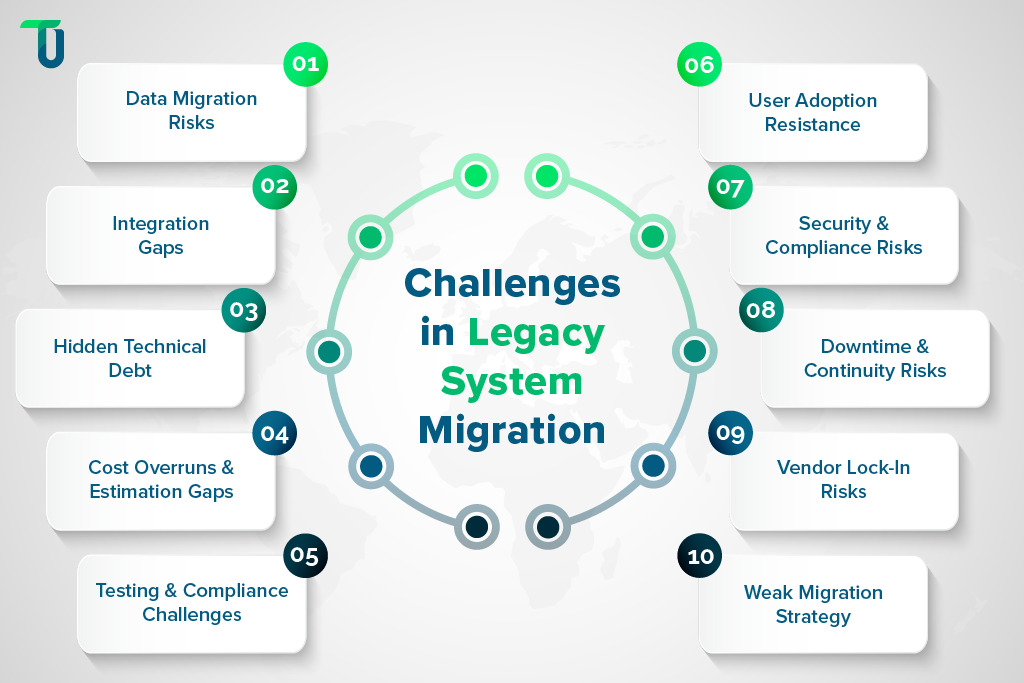
Top 10 Challenges of Legacy Systems Migration
Modernizing old infrastructure is a complex journey filled with technical and cultural hurdles that directly impact business continuity, security, and cost control. Explore these 10 critical legacy system migration challenges and learn how custom software development solutions provide a structured, low-risk approach to ensure a safe, successful transition without disrupting day-to-day operations.
Challenge #1: Data Migration Complexity and Hidden Risks
Moving data is more than just a copy-paste job during legacy system modernization. Legacy systems often store data in proprietary formats or unstructured silos that lack standard validation rules. Over decades, data quality degrades, leading to "dirty data" that can crash a new system or corrupt mission-critical business records.
How to Overcome This Challenge: To safeguard your organizational data and ensure high integrity, apply these tactics:
- Schema Mapping: Create a clear field-to-field map between old and new database structures.
- Data Cleansing: Remove duplicate records and fix formatting errors before the move starts.
- Mock Migrations: Run several test cycles in a sandbox to verify data integrity and logic.
- Recovery Snapshots: Maintain point-in-time backups to revert quickly if transformation fails.
Accurate data cleaning and testing prevent errors from breaking your new customized software solutions, making the final move much safer.
Challenge #2: Integration and Interoperability Gaps
A legacy system rarely sits alone in an enterprise environment; it likely connects to dozens of third-party tools or internal databases that support critical day-to-day operations, including specialized platforms such as Estate Move Management Software. It likely connects to dozens of third-party tools or internal databases that support critical day-to-day operations. When you switch to customized software solutions, these connections can break unexpectedly during migration. Modern APIs do not always talk to old protocols, leading to broken workflows and interrupted data exchange across systems.
How to Overcome This Challenge: To maintain seamless connectivity during the transition, implement the following steps:
- Middleware Layers: Build custom wrappers that translate modern APIs into legacy protocols.
- Dependency Mapping: Use discovery tools to identify undocumented third-party integrations.
- Message Queues: Implement asynchronous messaging to prevent system freezes during lag.
- API-First Design: Build the new architecture around standard APIs for future flexibility.
Smart integration planning ensures your new custom software development services talk to old tools reliably and securely without causing any major business disruptions to ongoing business workflows.
Challenge #3: Hidden Technical Debt and Codebase Entanglement
Legacy code is often a "spaghetti" of patches applied over years across multiple development cycles and teams. Developers frequently mention the frustration of finding undocumented logic deep inside the system that makes refactoring nearly impossible during legacy system modernization. One small change in an old module can cause a total system failure elsewhere due to tightly coupled dependencies.
How to Overcome This Challenge: Managing complex code dependencies effectively requires a structured approach:
- Logic Extraction: Use profiling tools to identify and isolate critical business logic.
- Strangler Pattern: Replace legacy features incrementally instead of a risky full rewrite.
- Code Documentation: Record why archaic logic exists to prevent accidental workflow breaks.
- Regression Testing: Run automated tests after every update to detect ripple effect bugs.
Fixing technical debt slowly helps your software development company modernize features safely and predictably without the risk of a total system crash or failure during enterprise-scale migration.
Challenge #4: Budget Overruns, Cost Blind Spots, and Estimation Failure
Migration projects are notorious for going over budget in large-scale legacy system modernization efforts. Hidden costs often emerge from extended testing phases, the need for specialized consultants, or unforeseen hardware requirements discovered mid-migration. Poor initial estimates often ignore the cost of running two systems at once during phased transitions.
How to Overcome This Challenge: Keep your financial projections stable by adhering to these budgetary best practices:
- Buffer Allocation: Set aside a 20% contingency fund for unforeseen technical hurdles.
- Milestone Tracking: Break the project into small phases to monitor spend versus progress.
- Dual-Run Estimates: Factor in the cost of hosting old and new systems simultaneously.
- Resource Auditing: Review monthly labor and cloud costs to identify early budget leaks.
Smart budgeting and careful cost tracking keep your custom software development solutions affordable over the long term while avoiding the trap of hidden project expenses that impact ROI.
Read More from TenUp
7 Rs of Cloud Migration: Strategies for Moving Apps to the Cloud
Digital Transformation: Legacy Migration & Application Modernization
Cloud Native Development Plan: How to Transform Legacy Apps
Challenge #5: Testing, QA, and Compliance Barriers
Legacy systems often lack documentation due to years of undocumented changes, making it hard to know what the "expected behavior" should be during modernization. This makes quality assurance a nightmare for both IT and compliance teams. Furthermore, meeting industry compliance standards during a transition is a high-stakes task with legal and financial consequences.
How to Overcome This Challenge: Ensuring high software quality and legal safety is easier with these testing protocols:
- Unit Testing: Create automated test scripts for every individual software component.
- Compliance Mapping: Tag every feature with its corresponding regulatory requirement code.
- User Acceptance: Involve real staff in UAT to catch workflow errors missed by IT.
- Audit Trails: Log every QA result and change to build a strong compliance history.
Professional testing and quality assurance guarantee that your enterprise software development project stays secure, functional, and fully compliant with laws throughout and after migration.
Challenge #6: Change Management and User Adoption Resistance
The human element is often the hardest part of migration in enterprise legacy system modernization projects. Staff members who have used a system for 20 years may resist the new interface due to habit and workflow dependency. There is also a "fear of losing modern skills" among developers who feel stuck managing old tech instead of working with modern architectures.
How to Overcome This Challenge: Achieve a smooth cultural transition by prioritizing these adoption strategies:
- Early Involvement: Include end-users in the initial design phase to gain their early trust.
- Skills Upskilling: Offer training in modern tech stacks to boost developer team morale.
- Simplified UX: Focus on an intuitive interface that mirrors familiar legacy workflows.
- Internal Champions: Appoint vocal supporters within teams to help peers adopt the system.
Involving users early and providing training makes adopting new customized software solutions much easier for your team at scale and reduces operational pushback after go-live.
Challenge #7: Security Vulnerabilities and Compliance Pitfalls
During migration, data is often "in flight" or temporarily stored in staging areas outside normal production safeguards. This is a prime time for cyber attacks targeting sensitive enterprise data. Legacy systems also lack the audit logs required by modern security standards, making it hard to track who accessed what during the move for compliance verification.
How to Overcome This Challenge: Protecting sensitive data from cyber threats involves implementing these core defenses:
- Data Encryption: Use TLS protocols to encrypt all information moving between servers.
- Access Control: Enforce multi-factor authentication for all migration tool users.
- Penetration Testing: Hire experts to find security holes before the final system launch.
- Activity Logging: Record all file access and user actions during the data move period.
Strong encryption and strict security checks protect your data while migrating, ensuring your customized software solutions stay safe from hacker threats and regulatory violations.
Challenge #8: Operational Downtime and Business Continuity Threats
Switching from old to new can lead to downtime during critical business hours. For a retail or healthcare business, even an hour of offline time results in lost revenue and service disruption. Many companies fear the "cutover" day because they lack a clear rollback plan and real-time visibility into system health.
How to Overcome This Challenge: Maintain business continuity during cutover by using these deployment methods:
- Off-Peak Scheduling: Execute the final switch during hours of lowest user activity.
- Blue-Green Deployment: Run the new environment parallel to the old for instant switching.
- Rollback Procedures: Document a step-by-step plan to revert to legacy if things fail.
- Real-Time Monitoring: Track system health metrics immediately after the final launch.
Using off-peak hours and backup plans prevents downtime, helping your software development company in the USA deliver a smooth system switch without business disruption.
Challenge #9: Vendor Lock-In and Loss of Architectural Independence
Many legacy systems are tied to a specific vendor’s proprietary hardware and software ecosystem. This makes migration difficult because the data is "locked" in a way that only that vendor can access easily without costly licensing or restrictions. Breaking free requires a shift toward open standards and flexible architecture design.
How to Overcome This Challenge: Secure long-term architectural freedom by adopting these vendor-neutral standards:
- Cloud-Agnostic Tools: Use containerization like Docker to avoid platform-specific locks.
- Open Source Tech: Prioritize open-source frameworks over proprietary vendor software.
- IP Ownership: Ensure your contract gives you full ownership of all custom code.
- Standard Formats: Save all organizational data in universal, non-proprietary formats.
Choosing open tech and owning your code gives you the freedom to change providers whenever your custom software development services require it without rework or data loss.
Challenge #10: Strategic Misalignment and Weak Migration Roadmaps
A migration often fails because it is treated as a task for the IT department rather than a business strategy owned by leadership, which is why many organizations rely on an enterprise outsourcing transformation guide for long-term modernization planning. Without clear goals, the project drifts, leading to a "new" system that still doesn't meet the actual needs of the company or deliver measurable value.
How to Overcome This Challenge: Aligning the project with your business vision requires these strategic steps:
- KPI Definition: Set measurable goals like speed improvement or cost reduction targets.
- ROI Prioritization: Build features that offer the highest business value in the first phase.
- Stakeholder Syncs: Hold regular meetings between IT and department heads for alignment.
- Agile Roadmaps: Use flexible planning to adjust the project as new needs arise.
A clear roadmap that matches your business goals ensures that your customized software solutions provide the highest possible return on your investment over time.
How Custom Software Development Solutions Reduce Legacy Migration Risk
Migrating from legacy systems carries high risk, but custom software development solutions significantly reduce that risk by enabling controlled, business-safe modernization. Instead of forcing a full system replacement, custom approaches allow enterprises to modernize incrementally while maintaining stability. Here are the 5 ways custom software development solutions protect your enterprise during a transition:
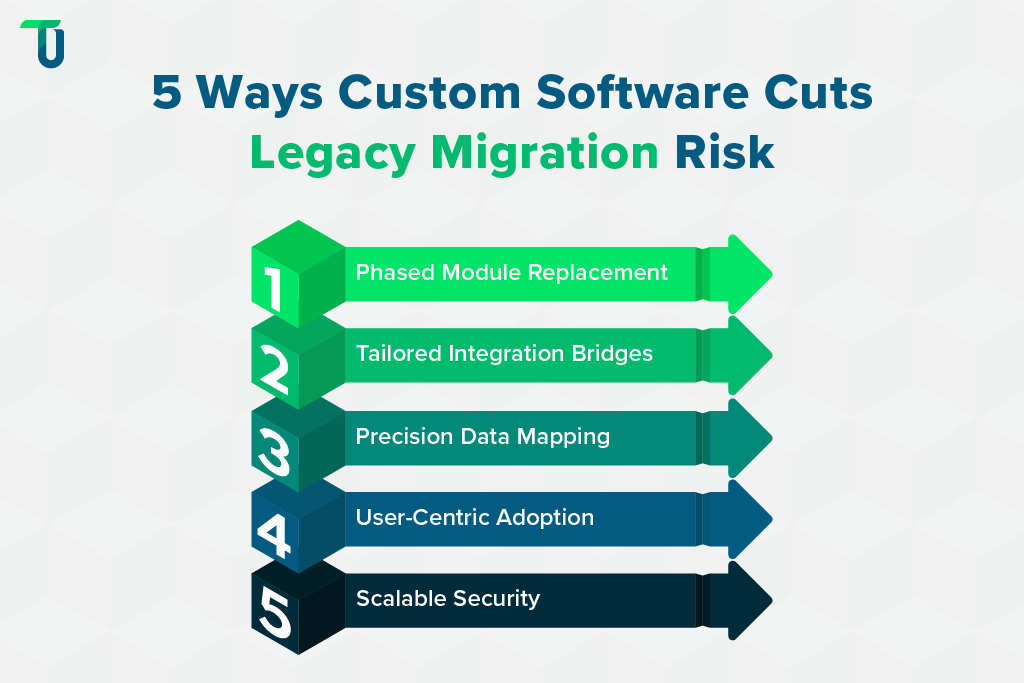
A. Surgical Module Replacement
Unlike rigid off-the-shelf products, customized software solutions allow for a phased migration. You can replace specific legacy functions one at a time. This method lowers the chance of a total system crash.
It also helps your team manage legacy technical debt without stopping daily operations. This incremental shift keeps the business stable while you modernize the core codebase.
B. Tailored Integration Bridges
Many legacy system migration challenges stem from old data formats that refuse to communicate with modern platforms. A dedicated custom software development company with expertise in Real Estate CRM Software Development builds tailored integration bridges that preserve property data, automate agent workflows, and ensure seamless CRM interoperability throughout the migration. A dedicated custom software development company builds specific adapters for your unique environment.
These bridges fix integration and compatibility issues by translating data between old and new systems. This ensures your essential third-party tools continue to work perfectly throughout the entire transition.
C. Precision Data Mapping
Data migration complexity often leads to lost records or corrupted files. Custom software development services include specific scripts designed for your exact data schema.
Experts clean your data before it moves to the cloud. This focus on data integrity prevents "dirty data" from entering your new environment. It protects your most valuable business assets from accidental deletion or formatting errors.
D. User-Centric Adoption Paths
Resistance from staff can sink a modernization project. Enterprise software development focuses on the actual habits of your employees. By building a user interface that feels familiar yet operates faster, you simplify change management & user adoption.
This reduces the learning curve and keeps morale high. Staff feel supported because the new software solves their specific pain points without adding complexity.
E. Scalable Security Architecture
Security is a major concern during cloud platform migration. Custom builds allow you to bake modern encryption and multi-factor authentication directly into the software. You get an environment that meets your specific industry compliance needs.
This proactive security approach identifies vulnerabilities early. It protects data while it is in transit and at rest, reducing the risk of a breach.
To encapsulate, by choosing customized software development, you gain a roadmap that prioritizes safety and business continuity.
Best Practices for Legacy System Modernization
Modernization is a high-stakes task that requires a disciplined approach. Following these best practices for legacy system modernization helps you navigate technical risks while you build stable custom software development solutions.
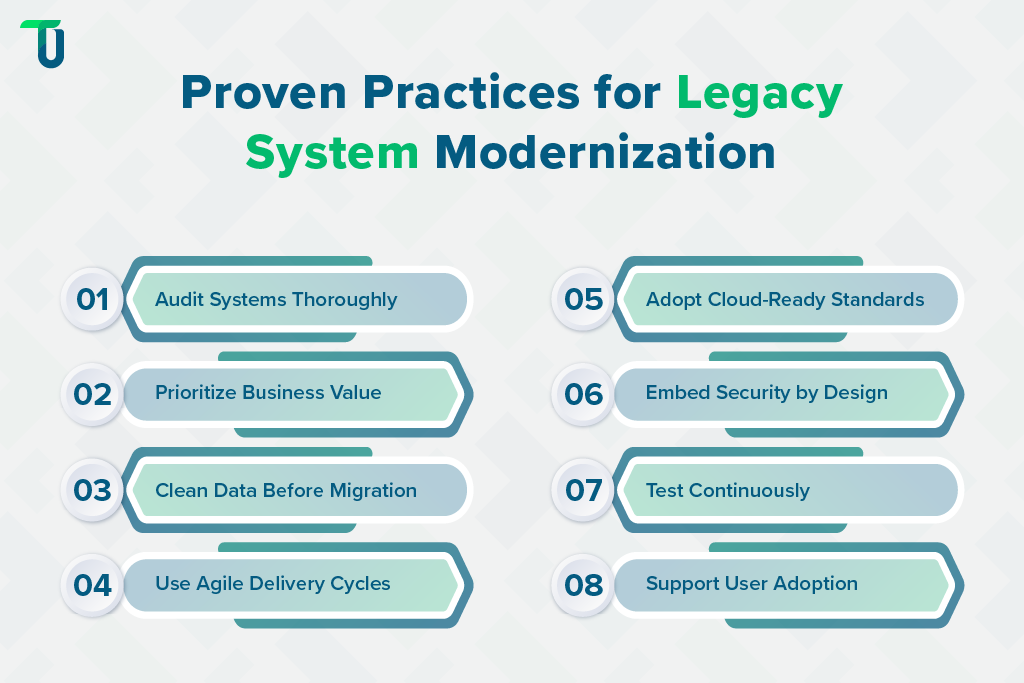
- Deep System Audit: Document every process and hidden dependency within your current setup. This clear baseline helps a custom software development company identify which parts of the code require immediate replacement.
- Prioritize Business Value: Start with modules that offer the highest return on investment. This focus on enterprise software development goals ensures that the most critical business functions modernize first.
- Clean Data Early: Resolve data migration complexity before the move begins. Fix errors and remove duplicates to prevent old, "dirty" data from corrupting your new, modern database environment.
- Choose Agile Sprints: Use short development cycles to test new features. This allows your team to pivot quickly if you find unexpected integration and compatibility issues during the build.
- Adopt Cloud Standards: Move to a modern infrastructure that supports rapid growth. Successful cloud platform migration relies on building software that scales easily as your business traffic and data volume increase.
- Enforce Strict Security: Build encryption and access controls into the initial code. Proactive security protects sensitive information and keeps your company compliant with the latest data protection laws and standards.
- Invest in Testing: Run automated scripts to check for bugs at every stage. Continuous testing and quality assurance prevent small errors from growing into major system failures after the launch.
- Support User Training: Create clear documentation to help staff learn the new interface. Strong focus on change management & user adoption reduces workplace friction and speeds up overall project success.
By following these practices, your business remains competitive, secure, and ready for future technological growth.
What to Look for in a Custom Software Development Company?
Choosing a partner to handle your legacy software modernization solutions is a high-stakes decision. The right team will not only write code but also navigate the complex risks of legacy technical debt and data loss. Here are the six factors to consider before you hire a partner for your project:
1. Proven Technical Expertise
A reliable partner must have deep knowledge of modern frameworks, including expertise in Cross-Platform Mobile App Developmentfor businesses seeking scalable solutions across iOS and Android platforms. You need a team that understands how to build scalable, high-performing applications that grow with your business.
- Verify their proficiency in your specific tech stack.
- Check for experience in enterprise software development.
- Look for certifications in cloud platforms and security.
Assessing their technical depth ensures they can handle complex coding requirements. This prevents future legacy technical debt that often arises from poor initial architecture.
2. Industry-Specific Experience
Domain knowledge helps a company understand your unique business workflows. A partner who knows your industry can anticipate challenges and provide more relevant customized software solutions.
- Review their portfolio for projects in your sector.
- Ask for case studies showing solved business problems.
- Confirm they understand your specific regulatory compliance needs.
Industry experience reduces the learning curve significantly during the discovery phase. This alignment is crucial when outsourcing custom software development to ensure the final product hits the mark.
3. Legacy Modernization Skills
Many projects involve updating old systems. The right company should have a clear enterprise custom software migration strategy to handle legacy software modernization solutions without disrupting your daily operations.
- Evaluate their approach to legacy system migration challenges.
- Check their history with data migration complexity.
- Inquire about their best practices for legacy system modernization.
Modernizing old code requires a delicate touch to maintain data integrity. At TenUp, we specialize in breathing new life into aging systems through strategic refactoring.
4. Transparent Communication Models
Success depends on how well the team shares information. You need a partner that maintains open lines of communication and provides regular updates throughout the entire development lifecycle.
- Ensure they use modern project management tools like Jira.
- Verify their availability during your primary business hours.
- Look for a dedicated project manager as your main contact.
Clear communication prevents misunderstandings and keeps the project on track. This transparency is a hallmark of any top-tier custom software development company operating today.
5. Focus on User Experience
Software is only useful if people actually use it. A partner must prioritize UI/UX design to drive change management & user adoption once the platform goes live.
- Ask to see examples of their previous interface designs.
- Inquire about their user testing and feedback loops.
- Check if they offer wireframing and prototyping services.
Intuitive design reduces training costs and increases overall efficiency for your team. Never compromise on usability, as it directly impacts the long-term ROI of your investment.
6. Comprehensive Support and QA
The relationship should not end at launch. Look for a firm that offers rigorous testing and quality assurance along with ongoing maintenance to keep your software running smoothly.
- Confirm they perform automated and manual security testing.
- Ask about their post-launch bug fixing and support policies.
- Discuss their plans for future cloud platform migration or updates.
Robust testing minimizes the risk of system failures after deployment. A commitment to quality assurance ensures your custom software development services provide lasting value for years.
TenUp's Take:Treat migration as a strategic business investment rather than a simple IT task. Start by modernizing high-impact modules first to see immediate ROI. This gradual approach reduces risk while building long-term architectural and financial freedom.
Modernize Your Enterprise Legacy Systems with TenUp
Legacy migration is a major hurdle for any growing business. While the risks of data loss and downtime are real, staying on an outdated platform is far more dangerous for your long-term success. A strategic move to modern architecture solves performance issues and closes security gaps that expose your data to threats.
Nevertheless, the process is full of complex technical barriers that require expert planning to avoid costly mistakes. This is where TenUp comes in to simplify your journey.
At TenUp, we provide elite custom software development solutions that solve your legacy challenges. Our experts build secure, scalable systems that protect your data and drive long-term business growth. Contact us today!
Modernize Legacy Systems Without Disrupting Operations
Legacy platforms often hide cost, security, and scalability risks. TenUp supports phased modernization with clear architecture decisions and minimal disruption.
Frequently asked questions
What is the biggest mistake companies make during legacy system migration?

The biggest mistake companies make during legacy system migration is treating it as a technical task instead of a business transformation. This leads to poor planning, dirty data being migrated, underestimated costs, weak testing, low user adoption, and new systems that fail to support real business goals.
Is it better to modernize a legacy system or replace it entirely?
In most enterprise cases, phased modernization is the safer choice, as it reduces risk, downtime, and disruption while extending system value. Full replacement is typically justified only when the legacy system is severely outdated, insecure, or actively limiting growth and compliance.
How do companies migrate legacy systems without disrupting daily operations?
Companies minimize disruption by using phased modernization, parallel run environments, and API-based integration, allowing legacy and new systems to operate simultaneously. Techniques like blue-green deployments, pilot migrations, and rollback plans ensure stability while changes are introduced incrementally.
How do you measure success after a legacy system migration?
Success is measured by comparing pre- and post-migration outcomes, including faster system performance, higher reliability, lower maintenance costs, improved security, and strong user adoption. The most meaningful indicator is whether the new system delivers measurable business value, not just technical completion.
Can legacy system migration improve cybersecurity, or does it increase risk?
Legacy system migration improves cybersecurity by replacing unsupported platforms with modern security controls like encryption, access management, and monitoring. Risk increases only during poorly planned migrations, when security is not built into data transfer, configuration, and integration from the start.
Why do legacy migration budgets often exceed initial estimates?
Legacy migration budgets often exceed estimates because hidden technical debt, poor data quality, and undocumented system dependencies surface only during execution. Additional costs also arise from extended dual-system operation, custom integrations, reskilling efforts, and unplanned scope changes.
How do custom software development solutions reduce legacy migration risk?
Custom software development reduces migration risk by enabling phased modernization, tailored integrations, and system-specific data handling that preserves critical business logic. This approach avoids forced compromises, minimizes disruption, and allows enterprises to modernize safely without breaking existing workflows.
When should a business involve leadership in a legacy migration project?
Leadership should be involved from the outset and remain engaged at key decision points throughout the migration. Because legacy migration affects strategy, cost, risk, compliance, and long-term competitiveness, it must be treated as a business transformation, not just an IT initiative.
Share the Article


