



While legacy applications are the backbone of many businesses, keeping them running comes with hidden costs. They slow down innovation, increase maintenance overhead, and make scaling a constant challenge. For organizations looking to stay competitive, modernizing these systems is no longer optional—it’s essential. Cloud native development provides a structured path to achieve this modernization. For businesses building a cloud modernization roadmap, this approach avoids risky “big bang” rewrites. Instead of trying to rip and replace critical systems in one risky move, the best practice is to evolve these applications gradually with cloud native app development, introducing scalability, resilience, and automation along the way, ensuring maximum ROI of cloud native development. This guide explains how to transform legacy applications into cloud native systems in eight practical steps. It also explores the issues you are likely to encounter during cloud native development and offers solutions to overcome them. So, let’s begin!
What Is Cloud Native Development?
Cloud native development is an approach to building and running applications that fully leverage the advantages of cloud computing. Unlike traditional applications that may be simply “moved” to the cloud, cloud native applications are designed with scalability, automation, and resilience in mind.
Key characteristics include:
- Microservices architecture – Applications are broken into smaller, independent services.
- Containers – Each service is packaged with its dependencies for portability and consistency.
- Dynamic orchestration – Platforms like Kubernetes manage scaling, networking, and resilience.
- DevOps practices – Continuous integration and delivery pipelines streamline updates and deployments.
For legacy systems, adopting cloud native principles doesn’t always mean a complete rebuild. It often involves selectively modernizing components, aligning them with business priorities, and ensuring a smooth transition with minimal disruption.
Steps to Transform Legacy Applications into Cloud Native Systems
Modernizing legacy systems is not about flipping a switch—it’s about following a clear, structured process. Each step builds on the previous one, helping you balance technical priorities with business goals. The following eight steps provide a practical roadmap to guide your cloud native journey, from initial assessment to full-scale optimization.
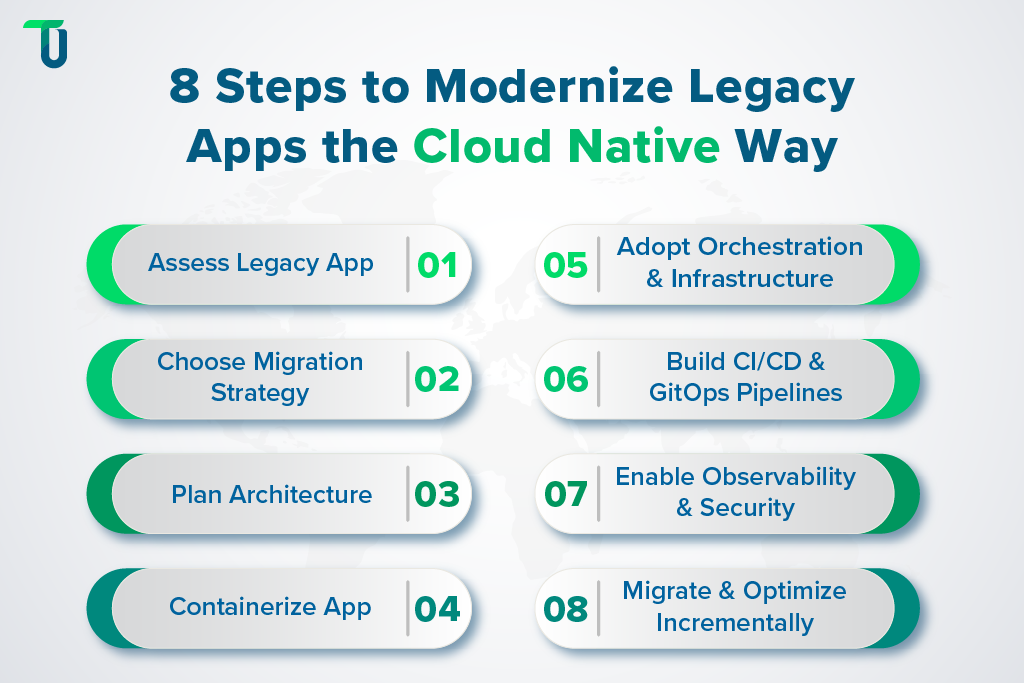
Step 1. Assess Your Legacy Application
The first step is to understand what you are dealing with. Every legacy system is different. Some may be monoliths with tightly coupled modules. Others may depend on old databases, APIs, or on-premise servers.
Start by asking simple questions:
- What are the core functions of the application?
- Which parts are critical for business continuity?
- What integrations or external systems does it rely on?
- Where do current performance issues come from?
A good assessment includes both technical and business perspectives. From the technical side, make a list of dependencies, frameworks, runtime versions, and data sources. From the business side, identify requirements such as uptime targets, compliance, and cost expectations.
The outcome of this step should be a clear picture of the system’s current state and a list of goals for the migration. For example: reduce downtime during updates, improve scalability, or lower hosting costs.
Recommended Read: Cloud-Native vs. Cloud-Based Applications: What’s the Difference?
Step 2. Choose the Right Migration Strategy
Once you know the system, you need to decide how to move it. Not every application needs the same level of change. There are 7 Rs of cloud migration, of which the 4 most common strategies are:
- Lift-and-shift (Rehost): Move the application as it is to the cloud. This is fast but does not remove technical debt.
- Replatform: Make small adjustments, such as moving from VMs to containers or switching to managed databases.
- Refactor (Re-architect): Break the application into smaller services and redesign parts of it to follow cloud native principles. This is more work but pays off in flexibility.
- Replace or rebuild: If the legacy system is too outdated, sometimes it is better to build a new application.
The choice depends on budget, time, and long-term business goals. For many organizations, the path is a mix: lift some parts, replatform others, and refactor the most critical modules — a crucial step in any legacy application modernization initiative, particularly when shifting from Traditional middleware vs cloud integration approaches The key is to prioritize. Start with high-value components where modernization brings the most benefits.
Step 3. Plan Your Architecture
Cloud native development is not only about moving code. It also requires carefully designing cloud architecture so different parts of the system work together seamlessly.
Cloud native development is not only about moving code. It also requires carefully designing a cloud modernization roadmap and cloud architecture so different parts of the system work together seamlessly. This stage is also where containerization and microservices adoption becomes a key architectural decision.
At this stage, define which modules can remain monolithic for now and which ones should become microservices. Decide how services will communicate, usually through APIs or an event bus.
Data migration is a big challenge in any modernization journey, often requiring careful planning around legacy system migration challenges and solutions to avoid data loss or inconsistencies. Splitting them can take time.
Common patterns include:
- Bulk migration of old data.
- Incremental migration with both systems running in parallel.
- Change data capture (CDC) where updates are streamed to new databases.
Also think about integration with other systems. A clear API contract helps ensure that new services can interact smoothly with old ones during the transition.
A well-defined architecture plan avoids unnecessary rework later and serves as the foundation for the following steps.
Step 4. Containerize the Application
Containers are at the heart of cloud native development. They allow applications to run consistently across environments. Unlike traditional deployment on servers, containers package everything needed: runtime, libraries, and configuration.
To containerize a legacy app:
- Start by creating Dockerfiles or equivalent.
- Use multi-stage builds to keep images small.
- Select lightweight base images to reduce security risks.
- Test locally before moving to larger environments.
Containerization provides portability. You can run the same container on a developer’s laptop, in staging, or in production. Partnering with a cloud native app development company at this stage ensures the right containerization approach, aligning with your DevOps and cloud transformation consulting goals. It also simplifies scaling because multiple copies of a container can run in parallel when demand increases.
Transform Legacy Apps Into Cloud Native Systems
From assessment to execution, TenUp provides the right expertise to make your cloud native development smooth, secure, and cost-efficient.
Step 5. Adopt Orchestration and Infrastructure
Running a few containers is simple. Running hundreds is not. This is where orchestration comes in.
Kubernetes has become the standard platform for managing containers at scale. It handles scheduling, scaling, self-healing, and networking. Most cloud providers offer managed Kubernetes services, which reduce operational overhead.
In addition to orchestration, think about infrastructure management. Infrastructure as Code (IaC) tools such as Terraform, Pulumi, or Helm charts allow teams to define environments in code. This brings repeatability and reduces manual errors.
For advanced traffic management, security, and observability, a service mesh like Istio or Linkerd can help. However, it is best to introduce these only when necessary. Keep the initial setup simple and expand later as needs grow.
Step 6. Build CI/CD and GitOps Pipelines
Modern applications need automated delivery pipelines, and adopting CI/CD and DevSecOps pipelines ensures faster releases while maintaining security, compliance, and code quality throughout the lifecycle. Continuous Integration (CI) ensures every code change is tested and built into a container image while Continuous Deployment (CD) ensures that tested changes reach production reliably.
A typical pipeline includes:
- Code commit and automated build.
- Unit tests, integration tests, and security scans.
- Push container images to a registry.
- Deploy to Kubernetes or another platform.
GitOps takes this one step further. Instead of manually applying configurations, the desired state of the system is stored in Git. For businesses aiming to accelerate digital transformation, implementing CI/CD with GitOps is a critical capability — and can be streamlined with DevOps and cloud transformation consulting expertise. Tools such as Argo CD or Flux monitor the repository and apply changes automatically. This approach provides transparency, version control, and easy rollback.
It is recommended to partner with top cloud consulting services providers like TenUp for the effective design and implementation of these pipelines.
Related Read: How to Build Scalable Cloud-Based Apps: A Step-by-Step Beginner’s Guide
Step 7. Enable Observability and Security
Migrating to the cloud is not only about deploying applications. You also need to monitor, secure, and manage them.
Observability means collecting logs, metrics, and traces. These three pillars give insight into system health and help detect issues quickly. Tools like Prometheus, Grafana, and OpenTelemetry are commonly used.
Security must be addressed early. Key practices include:
- Scanning container images for vulnerabilities.
- Managing secrets with tools like HashiCorp Vault or cloud KMS.
- Setting proper access controls with Role-Based Access Control (RBAC).
- Automating compliance checks.
Defining Service Level Objectives (SLOs) and tracking error budgets help align system performance with business expectations. This way, the migration not only modernizes technology but also improves reliability.
Step 8. Execute Incremental Migration and Optimize
The last step is to actually move workloads. A proven method is the Strangler Fig pattern. Instead of rewriting everything, you build new services alongside the old system. Over time, traffic is routed from the legacy modules to the new ones until the old system can be retired.
Use deployment strategies that reduce risk:
- Canary releases: Roll out to a small group of users first.
- Blue/green deployments: Keep two environments and switch traffic between them.
- Feature flags: Enable or disable features without redeploying.
Once the migration is complete, focus on optimization. Monitor resource usage, scale efficiently, and control costs. Cloud native development makes it possible to continuously adjust and evolve the system instead of letting it grow stale.
Finally, decommission the legacy components step by step. This avoids paying for duplicate infrastructure longer than necessary.
TenUp's Take: Always align your migration strategy with business goals, not just technology trends. Start with the most valuable modules, validate each stage with testing, and invest in team training. This ensures smoother adoption and avoids costly setbacks.
Business Benefits of Cloud Native Development
Modernizing legacy applications isn’t just an IT project — it’s a business-critical initiative. Cloud native development services help enterprises modernize legacy systems, reduce costs, accelerate innovation, and stay competitive. Here’s why businesses invest in enterprise application modernization:
- Cut Costs & Reduce Technical Debt: Moving to containerized, cloud-native environments lowers infrastructure spend and minimizes maintenance overhead. Organizations following a cloud cost optimization strategy typically see measurable savings as part of their cloud modernization roadmap.
- Accelerate Time-to-Market: Automated CI/CD pipelines and GitOps workflows enable faster releases, quicker bug fixes, and continuous innovation — a critical advantage for businesses focused on accelerating digital transformation.
- Scale Seamlessly: Cloud-native architectures auto-scale to handle seasonal peaks and unpredictable workloads, improving customer experience without overprovisioning — a core benefit of legacy to cloud migration services.
- Boost Application Reliability: Self-healing containers, rolling updates, and automated failover reduce downtime and SLA risks, making your systems ready for cloud migration consulting audits, and compliance checks.
- Strengthen Security & Compliance: Built-in RBAC, secrets management, and automated vulnerability scans help meet regulatory standards — a must-have for organizations investing in cloud native consulting.
- Enable Long-Term Innovation: Break free from monolithic limitations — adopt containerization and microservices with modern DevOps practices to support future product roadmaps and ensure ROI of application modernization services.
Challenges in Modernizing Legacy Systems with Cloud Native Development
Modernizing legacy applications is rewarding, however it is not without obstacles. Here are some common issues and ways to deal with them.
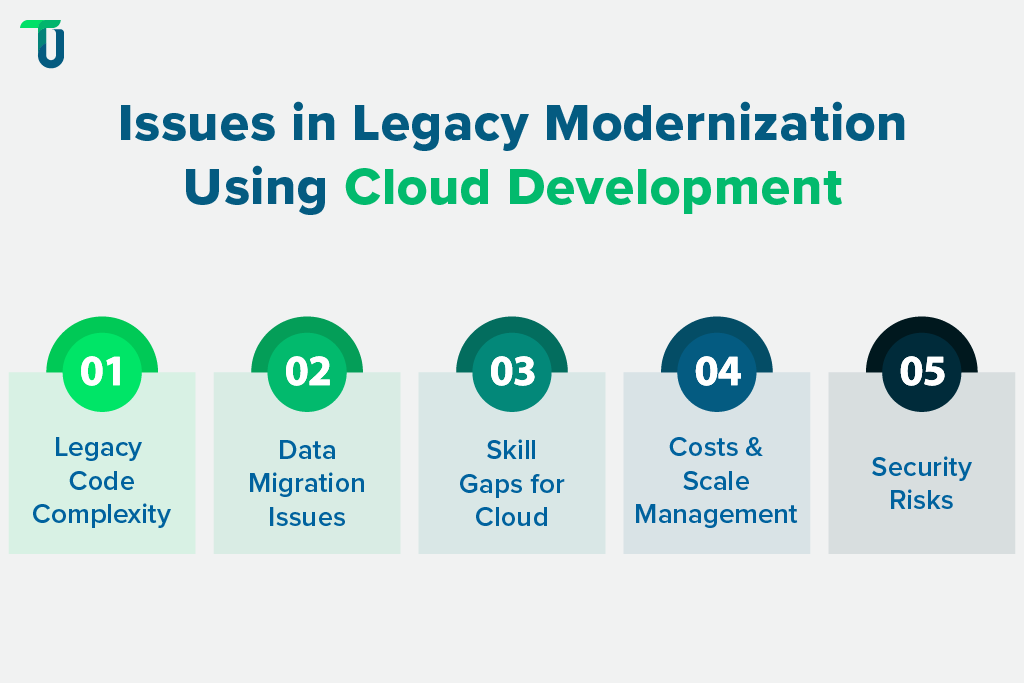
Challenge #1: Legacy Code Complexity and Hidden Dependencies
Many legacy applications have grown over years with little documentation. Dependencies may be hardcoded, or critical modules may rely on outdated libraries. This makes moving to cloud native development more difficult.
Solution: Start with a dependency analysis using static code tools and runtime tracing. Document critical paths and isolate them first. Breaking the work into smaller modules prevents surprises later.
Challenge #2: Data Migration Difficulties
Most legacy systems run on large monolithic databases. Splitting them into services can be challenging because data models are often tightly coupled.
Solution: Use patterns like change data capture (CDC) to stream updates into the new database while keeping the old one active. Migrate data incrementally instead of all at once. Test thoroughly to ensure consistency.
Challenge #3: Skills Gap in Cloud Native Tools
Teams used to traditional development may lack experience with containers, Kubernetes, or DevOps pipelines. This slows progress and increases mistakes.
Solution: Provide targeted training and start with a pilot project. Hands-on learning with a smaller module helps the team gain confidence before handling large-scale migration. Partnering experienced engineers with newcomers also shortens the learning curve.
Challenge #4: Cost Overruns if Scaling Is Not Managed
Cloud native systems can scale easily, but without limits, they can generate unexpected bills. Uncontrolled resource usage often surprises teams after migration.
Solution: Set resource quotas and use cost monitoring tools such as KubeCost or cloud provider dashboards. Review usage regularly and right-size workloads. Automating scale-down policies during low traffic hours also helps.
Challenge #5: Security Blind Spots with Distributed Systems
Cloud native development spreads workloads across services, which increases the attack surface. Misconfigured access or weak container images can expose systems.
Solution: Integrate security from the start. Scan container images, enforce RBAC, and use secret management tools. Regular audits and monitoring reduce risks before they become incidents.
Partner with TenUp Soft for Successful Cloud Native Development
Modernizing legacy applications through cloud native development is not about a quick overhaul. It is about steady and intentional progress. The 8 steps you have just gone through form a clear playbook that keeps operations safe and scalable throughout. However, every organization faces its own challenges, such as hidden dependencies, data migration hurdles, or cost and security concerns. This is where TenUp Soft comes in.
We at TenUp Software Services have deep experience in cloud solutions, legacy migration, DevOps, and infrastructure automation. Our experts understand how to move systems forward without losing grip on day-to-day delivery and provide hands-on support across any of these phases. Get in touch with our experts today to start your cloud native journey.
Maximize Success with the Right Cloud Solution Partner
Migrating legacy apps is complex. TenUp helps you simplify each step of cloud native development with proven expertise and reliable delivery.
Frequently asked questions
How do I choose the right partner for legacy application modernization?

Choose a partner with deep experience in legacy systems, cloud native development, and DevOps automation. Look for case studies and a clear modernization roadmap that uses phased migration to minimize downtime. The right partner should align with your business goals, offer containerization and microservices expertise, and provide ongoing support to ensure long-term ROI.
Can I modernize my application in phases without disrupting business operations?
Yes. Phased modernization is the safest and most effective approach. Use strategies like the Strangler Fig pattern, canary deployments, and blue/green releases to migrate modules gradually while keeping your legacy system live. This minimizes downtime, reduces risk, and ensures business continuity throughout the transition.
What ROI can I expect from cloud native modernization in the first 12 months?
Most companies achieve ROI within 12–15 months, with 20–30% lower infrastructure costs and 2–3x faster release cycles. Automating CI/CD, right-sizing cloud resources, and phasing migrations can maximize first-year gains while reducing risk and downtime.
What are the most common risks of cloud native modernization, and how do you mitigate them?
Key risks include security misconfigurations, data migration errors, hidden dependencies, and runaway cloud costs. Mitigate them by auditing dependencies early, using phased migration patterns, enforcing RBAC and automated security scans, and setting cost guardrails with monitoring tools.
Can I combine replatforming and refactoring strategies in the same migration project?
Yes, a hybrid approach is a common choice. Replatform first to move workloads quickly, then refactor high-impact modules in phases to unlock scalability, performance, and cloud-native benefits. This approach balances speed, cost, and long-term ROI while minimizing disruption.
Which cloud native development practices deliver the highest ROI?
Practices like containerization with Kubernetes, automated CI/CD pipelines, GitOps, and FinOps-driven cost monitoring deliver the highest ROI. They cut infrastructure waste, speed up deployments, and enable on-demand scaling, boosting productivity and lowering total cost of ownership.
How does containerization help reduce cloud migration risks?
Containerization ensures apps run identically across environments, eliminating compatibility issues. It supports quick rollbacks, fault isolation, and controlled scaling, reducing downtime, vendor lock-in, and migration complexity.
What metrics should I track to measure modernization success?
Track deployment frequency, lead time for releases, uptime, MTTR, and cloud cost per user. Pair these with ROI and user adoption rates to confirm modernization delivers business value, not just technical improvements.
Share the Article


