


Enterprises winning with cloud today made one decision differently: they treated migration as an execution discipline, not a logistics exercise. Cloud application migration services deliver transformational ROI only when decisions are right.
By 2027, over 70% of enterprises will use cloud platforms to accelerate business, says Gartner. Yet cost overruns remain one of the top reasons programs fail to deliver ROI. The gap is rarely the platform; it is how enterprises move.
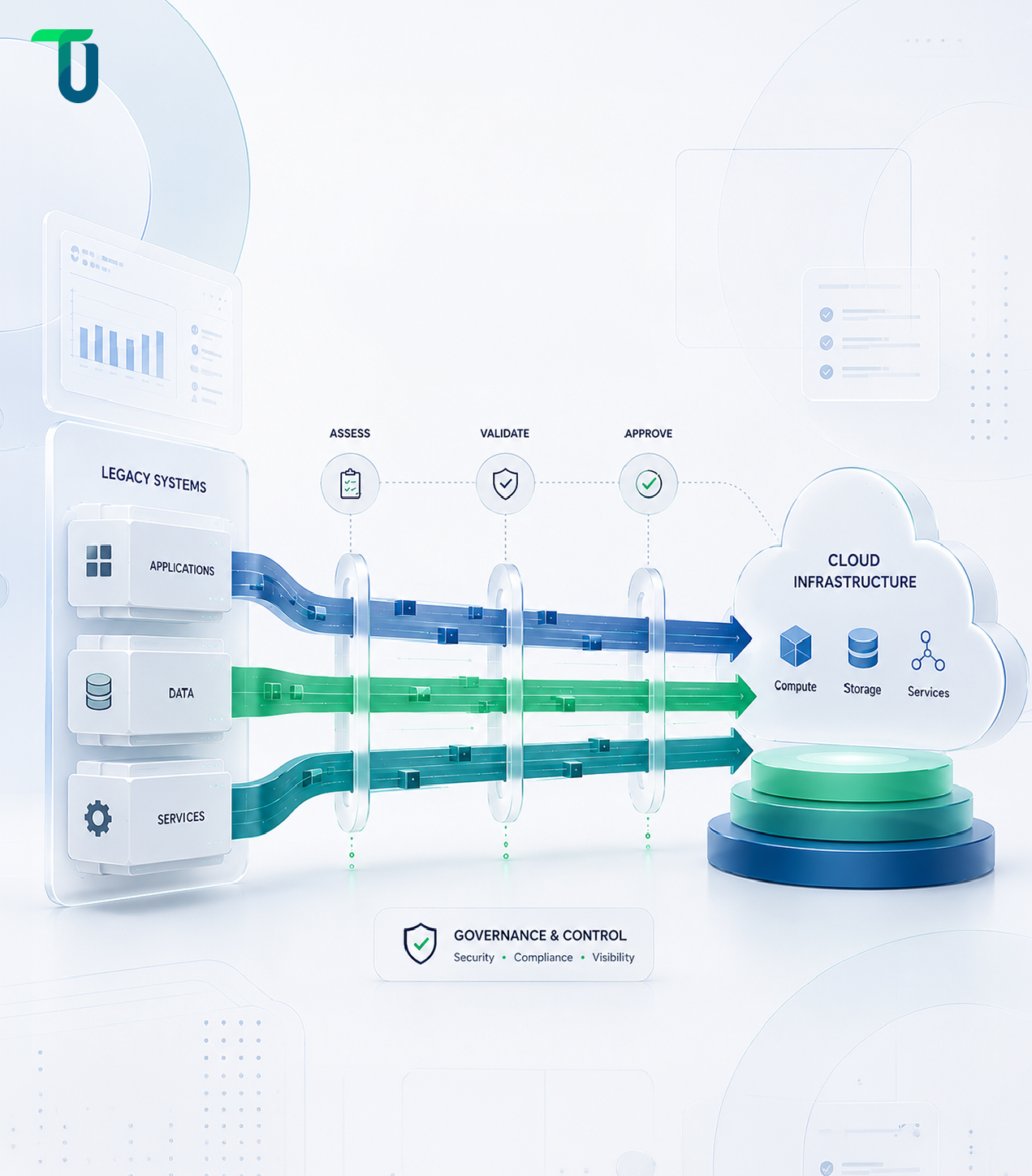
Cloud application migration services cover the end-to-end process of moving applications, data, and infrastructure from on-premises or legacy environments to cloud platforms, or between providers, with modernization needed to ensure performance, scalability, and security.
Most enterprises declare migration complete when applications run in the cloud. Those that see real ROI define completion differently: lower cost per transaction, faster deployment cycles, and measurable resilience improvements. This blog outlines eight implementation strategies that bridge that gap, drawn from practitioner experience and recurring enterprise migration failures.
What Are Cloud Application Migration Services And Why Most Enterprises Get Them Wrong
Cloud application migration services cover the full lifecycle of moving enterprise applications from on-premises infrastructure or legacy systems to cloud environments, or from one cloud provider to another, including assessment, architecture design, migration execution, modernization, and post-migration optimization. What they are not is a simple infrastructure transfer.
The distinction most enterprises miss is the difference between migration and modernization. Migration moves an application. Modernization changes how it works. Treating them as the same engagement produces the worst outcome of both: applications that land in the cloud still running legacy logic, carrying technical debt that no infrastructure change resolves, and consuming cloud resources at on-premises utilization patterns never designed for consumption-based billing.
The enterprises that achieve the strongest outcomes from cloud modernization services commit to one discipline before any workload moves. They define success in business terms. Latency targets. Cost per transaction. Deployment frequency. Incident rate. Without that baseline, there is no way to measure whether the migration delivered anything beyond a change of address for your servers.
The benefits of using professional cloud application migration services go beyond moving workloads. They bring assessment discipline, architecture expertise, and post-migration accountability that most internal teams build only after their first costly migration. The result is faster time to value, lower risk of cost overruns, and a cloud environment that performs as the business case promised.
The 7 Rs Framework: Choosing the Right Migration Strategy for Each Workload
The AWS-inspired 7 Rs framework is widely adopted for classifying how every application should move to the cloud. The goal is not to select one strategy for the entire organization. It is to match the right approach to each workload based on business value, technical complexity, and modernization payoff.
| Strategy | Definition | When to Use | Speed vs. Payoff |
|---|---|---|---|
| Rehost | Move as-is to cloud (lift-and-shift) | Deadline-driven migrations, stable workloads | Fast, low engineering lift |
| Replatform | Minor optimizations without code changes | Apps benefiting from managed services like Amazon RDS | Moderate speed, moderate payoff |
| Refactor | Re-architect for cloud-native design | High-value apps needing scalability, AWS Lambda, microservices | Slow, high modernization payoff |
| Repurchase | Replace with SaaS alternative (e.g., Salesforce) | Commodity functions: CRM, HR, email | Fast, low long-term ownership |
| Retire | Decommission unused or redundant apps | Apps with no active users or business case | Immediate cost reduction |
| Retain | Keep on-premises for now | Compliance constraints, recent capital investment | None, deferred decision |
| Relocate | Hypervisor-level lift, VMware Cloud on AWS | VMware workloads with complex operational dependencies | Fast, minimal disruption |
Rehost vs. Refactor: The Core Enterprise Tradeoff
Rehost buys speed. It moves workloads without touching code, delivers immediate data center cost reductions, and requires minimal engineering lift. It is the right call for deadline-driven programs and stable workloads where speed outweighs modernization payoff.
Refactor buys agility. It re-architects applications for cloud-native performance using microservices, serverless, and modern deployment patterns. The investment is significantly higher in time, budget, and engineering depth, but the long-term operational cost is substantially lower than running the legacy equivalent.
The watch-out on Rehost: enterprises that move workloads without a documented Refactor roadmap typically revisit the same applications within three years at a higher cost.
The watch-out on Refactor: attempting to re-architect the full portfolio simultaneously is the most common cause of migration program overruns.
The decision is a timeline and risk question, not a technical preference.
For a full breakdown of each strategy including decision criteria and risk profiles, see TenUp's dedicated guide to the 7 Rs of Cloud Migration.
Not sure which migration strategy fits each workload in your portfolio?
TenUp helps enterprise teams build workload-by-workload migration roadmaps matched to business outcomes, not just technical feasibility.
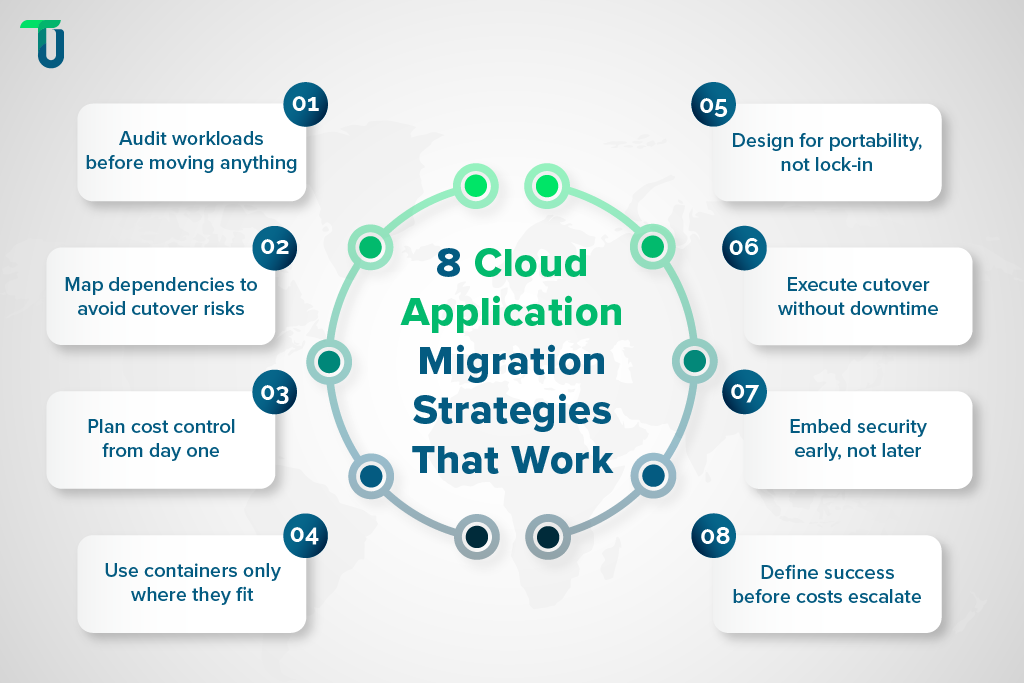
Strategy 1: Know What You're Moving Before You Touch a Single Workload
The single most reliable predictor of a migration program's success is the quality of its pre-migration assessment. Enterprises that skip or compress this phase inherit every assumption they failed to test and pay for each one during execution.
A rigorous assessment covers four areas:
- Application inventory: Every workload, its business owner, its criticality tier, and its current performance baseline.
- Cloud readiness evaluation: Which workloads are strong migration candidates, which should be retained on-premises, and which should be retired rather than migrated.
- TCO baseline: The true on-premises cost per workload: hardware amortization, licensing, support, power, and staff time, so cloud cost comparisons are honest rather than optimistic.
- Target architecture definition: Each workload mapped to the right migration strategy before a single resource is provisioned.
Tools like AWS Migration Hub and Azure Migrate automate significant portions of inventory and readiness assessment. They surface compute requirements, storage dependencies, and network configurations that manual audits miss at scale. The output of assessment is not a report. It is a migration sequencing plan that determines which workloads move first, which move last, and which never move at all. An enterprise that enters migration without this sequencing plan is not executing a program. It is running a series of uncoordinated experiments with production systems.
Strategy 2: Get Dependency Mapping Right to Prevent Cutover Failures
Application dependency mapping is the process of documenting every connection, integration, and data flow between applications before migration begins. It is the most consistently skipped step in enterprise cloud migration programs and the most expensive one to skip.
The failure pattern is well-documented across practitioner communities. Automated discovery tools identify the obvious dependencies. The critical ones surface during the cutover window, under pressure, with no rollback plan ready. A legacy batch job consuming an undocumented API endpoint. A reporting tool pulling directly from a production database. A third-party integration with a callback URL hardcoded to an on-premises IP address. Each of these represents a cutover failure that a dependency map would have caught weeks earlier.
Why Automated Tools Are Not Enough
Tools like AWS Application Discovery Service, Azure Migrate, and commercial platforms like CAST Highlight capture network-level and process-level dependencies. They do not capture undocumented integrations built by teams that have since turned over, scheduled batch processes that run weekly or monthly and fall outside discovery scan windows, or soft dependencies, applications that do not fail immediately but degrade silently when a connected service moves.
The gap is filled by structured manual interviews with application owners, infrastructure leads, and support teams. The questions that matter most:
- What scheduled jobs consume this application?
- Who else calls this API?
- What breaks if this service is unreachable for 10 minutes?
The answers these interviews surface are consistently the ones automated tools miss.
Migration Sequencing From Dependency Data
The output of dependency mapping is a migration sequencing map. Applications with the most inbound dependencies migrate last. Applications with no downstream consumers migrate first, building team confidence and validating tooling before high-stakes workloads move. Dependency mapping is not a documentation exercise. It is the risk control that makes every subsequent strategy executable.
Strategy 3: Build Cost Governance Into the Migration Plan, Not After
Without cost governance architecture in place before migration begins, cloud bills will not reflect cloud efficiency. They will reflect on-premises utilization patterns billed by consumption. That distinction is where migration budgets collapse.
On-premises infrastructure is sized for peak load and amortized over years. Cloud infrastructure billed by consumption, without guardrails, immediately exposes that peak-load sizing as a direct cost liability. Over-provisioned instances, untagged resources, idle environments, and data egress charges compound from day one, not from day 60. According to Flexera's 2024 State of the Cloud Report, optimizing existing cloud usage remains the top initiative for enterprises for the third consecutive year, which means most organizations are still correcting governance decisions they should have made before migration.
Cost Governance Before Migration
Three controls must be in place before any resource is provisioned. First, a tagging taxonomy: every resource carries tags for application, environment, cost center, and owner. Untagged resources cannot be attributed, governed, or decommissioned with confidence. Second, workload-level budget alerts using AWS Budgets or Azure Cost Management: alerts at 80% and 100% of projected spend give teams time to act before overruns compound. Third, a TCO baseline per workload that models cloud cost at expected utilization, not peak utilization.
Rightsizing as a Migration Step
AWS Cost Explorer, Azure Advisor, and GCP Active Assist all provide rightsizing recommendations, but only after utilization data accumulates. The practical approach is to migrate at conservative sizing, instrument observability from day one, and use the first 30 days of production data to rightsize before costs normalize at the wrong level. A cloud migration without cost governance architecture is a budget transfer, not a transformation.
Strategy 4: Know When Containerization and Kubernetes Are the Right Call
Containerization packages applications and their dependencies into portable, isolated units using Docker. Kubernetes adds automated deployment, scaling, and self-healing on top of that foundation, making it the industry-standard orchestration platform for containerized workloads at scale.
The business case for containerization is real: consistent environments across development, staging, and production; faster deployment cycles; and infrastructure portability that reduces vendor lock-in risk. For high-traffic, high-complexity applications, Kubernetes-managed microservices architecture delivers measurable operational leverage.
The risk is equally real and consistently underreported. Engineering teams document the same pattern: Kubernetes clusters, Argo CD pipelines, and full CI/CD infrastructure built before a single workload is validated in production, consuming months of capacity on orchestration tooling rather than business outcomes. This is the over-engineering failure mode that hits smaller teams and early-stage cloud programs hardest.
When containerization is the right call:
- Variable, unpredictable traffic patterns requiring dynamic scaling
- Workloads being refactored into microservices
- Teams with existing Kubernetes operational maturity
- Multi-cloud portability as a stated architectural requirement
When it is not:
- Small teams validating a new cloud environment for the first time
- Stable, low-traffic internal applications where managed PaaS services deliver equivalent value at lower operational cost
- Rehost migrations where speed is the primary objective
TenUp's Take: Most enterprises treat containerization as a migration checkbox. The teams that get the most from Kubernetes treat it as an operational capability that requires dedicated investment in runbooks, on-call readiness, and incident response, before the first containerized workload goes to production. Skipping that investment does not eliminate the operational complexity. It just defers it to the worst possible moment.
Strategy 5: Avoid Vendor Lock-In With a Portable Cloud Architecture
Most enterprises understand the vendor lock-in risk intellectually, but few architect against it practically, and the reason is convenience. AWS, Azure, and GCP each offer deeply integrated managed services that accelerate development and reduce operational overhead. The cost of that convenience is architectural dependency that compounds with every service adoption. Within three to five years, enterprises that did not architect for portability find themselves negotiating cloud contracts from a position of zero leverage.
The practical risk is not that a hyperscaler disappears. It is that pricing changes, service deprecations, or a strategic acquisition force a renegotiation that the enterprise cannot win. Enterprises with portable architectures negotiate from strength.
The Portability Decision Framework
Not all managed services carry equal lock-in risk. Lower lock-in risk services that are generally safe to adopt include managed Kubernetes across EKS, AKS, and GKE, which is portable by design; managed relational databases with standard SQL interfaces; and object storage with S3-compatible APIs. Higher lock-in risk services that require portability evaluation before adoption include proprietary serverless platforms with provider-specific event models, provider-specific ML platforms with non-portable data formats, and managed workflow orchestration services with proprietary DAG definitions.
IaC as the Portability Enabler
Terraform and AWS CloudFormation both codify infrastructure in version-controlled, repeatable templates. Terraform's multi-provider support makes it the stronger choice for enterprises operating across AWS, Azure, and GCP. Infrastructure defined in Terraform can be re-pointed to a different provider with significantly less rework than provider-native IaC tools require. Architecture decisions made at migration time determine optionality for the next decade.
Choosing the right cloud platform for enterprise application migration depends on workload requirements, portability needs, and long-term cost strategy. For a detailed comparison of AWS, Azure, and GCP against these criteria, see TenUp's guide to AWS vs Azure vs Google Cloud.
Strategy 6: Execute Zero-Downtime Cutover Before Two Systems Become the Norm
Downtime during cutover is the most visible failure mode in cloud application migration and the most preventable. The technical patterns for zero-downtime migration are well established. The failure is almost never technical. It is organizational.
The specific failure pattern practitioners describe most consistently is running dual environments for 12 to 18 months with no clear decommission path — a state where teams intended a three-month phased migration and found themselves maintaining two full stacks indefinitely. Both environments require support. Both require security patching. Neither is fully trusted by the teams operating them. The cost is financial, operational, and organizational, with engineers maintaining two stacks simultaneously and accountability diluted across both.
Zero-Downtime Cutover Architecture
Three patterns deliver reliable zero-downtime migration. Blue-green deployment maintains two identical environments. Traffic routes to the new environment, the team monitors, and the old environment decommissions only after stability is confirmed. Rollback is a traffic switch, not a recovery operation. Canary releases route a percentage of traffic to the new environment: 5%, then 25%, then 100%, with automated rollback triggers on error rate or latency thresholds. Database replication with deferred cutover replicates production data to the cloud environment in real time, keeping the legacy system as the write master until the final cutover window, reducing that window to minutes rather than hours.
Hard Decommission Deadlines as a Governance Mechanism
When TenUp partnered with a leading private equity firm to consolidate disparate warehouse management systems across multiple portfolio companies into a single centralized platform, the migration required parallel operation of both old and new systems during transition.
The engagement reached 100% migration completion because the program was structured around defined decommission milestones with executive accountability at each phase, not open-ended parallel operation with no deadline. Each milestone had a named owner, a confirmed exit criterion, and a cutover date that the business had formally committed to.
Every week a legacy environment stays alive without a hard deadline, it costs money, consumes support capacity, and signals to the organization that the migration is incomplete, because it is.
Hard decommission deadlines are a board-level governance decision, not a technical one. Teams without accountability to a decommission date will not decommission. Indefinite coexistence is not a migration strategy. It is an organizational risk dressed as caution.
Strategy 7: Build Security and Compliance Into Migration Architecture, Not Post-Go-Live
Security failures discovered after a cloud migration are not new vulnerabilities introduced by the cloud. They are existing vulnerabilities that the migration exposed. Misconfigured IAM policies, unencrypted data stores, overly permissive network rules, and compliance gaps that existed on-premises follow workloads to the cloud. In a cloud environment, they are frequently more exposed than they were on-premises.
The regulatory stakes are significant. Enterprises subject to HIPAA, SOX, or PCI-DSS cannot treat compliance as a migration deliverable. It must be an architectural constraint that shapes every infrastructure and access decision from day one.
Security Architecture During Migration
A Zero Trust framework assumes no implicit trust between services, users, or network segments. Every access request is authenticated and authorized explicitly, regardless of whether it originates inside or outside the cloud perimeter. IAM with least-privilege access defines roles at the workload level, not the team level. Every service, pipeline, and user account carries only the permissions its specific function requires. Encryption in transit and at rest must be default, with key management through AWS KMS or Azure Key Vault providing centralized control and auditability. Cloud Security Posture Management tools such as Prisma Cloud, Wiz, or AWS Security Hub must be active from the first day of infrastructure provisioning, not after go-live.
For HIPAA-covered workloads, data residency requirements must be defined before cloud region selection. For SOX-covered applications, audit trail architecture is a first-class infrastructure concern, not a documentation task. Security built into migration architecture costs a fraction of the remediation bill that follows a post-migration security audit.
Strategy 8: Define What Done Looks Like Before the Cloud Bill Tells You
The most underserved question in cloud application migration is the simplest one: when is the migration complete? The default answer: when workloads are running in the cloud, produces doubled cloud bills, degraded performance, and executive teams questioning whether the investment was justified.
Migration is complete when each workload performs better than it did on-premises, at a lower or equivalent cost, with measurable improvements in deployment frequency and incident response. That definition requires a baseline established before migration begins and a measurement framework confirmed before go-live.
Post-Migration Success Scorecard
Define and track these KPIs for every production workload within 30 days of cutover:
| KPI | What It Measures | Target Signal |
|---|---|---|
| Latency delta | p95 response time vs. pre-migration baseline | Equal or improved |
| Cost delta | Monthly cloud spend vs. on-premises TCO equivalent | At or below on-premises cost within 90 days |
| Deployment frequency | Releases per week vs. pre-migration baseline | Increased, 2x target for refactored workloads |
| Incident rate | Production incidents per month vs. baseline | Reduced or stable |
| MTTR | Mean time to recovery vs. baseline | Reduced |
FinOps as a Continuous Practice
Post-migration optimization is not a one-time exercise. Cloud environments change as traffic patterns shift, new features launch, and team size grows. A FinOps operating model ensures cost visibility, rightsizing, and accountability are continuous practices rather than quarterly reviews. Decommission confirmation, such as formal verification that legacy infrastructure is shut down, access credentials are revoked, and old environment costs are no longer accumulating, is the final step most teams forget to close.
Migration without a post-migration performance baseline is a project. Migration with one is a transformation.
Cloud Application Migration Services: What Separates Success From Failure
The eight strategies in this guide are pre-conditions, not post-migration tasks. Assessment scope, dependency mapping, cost governance, security design, and decommission planning determine migration outcomes before the first workload moves. Enterprises that treat them as execution steps rather than foundational decisions consistently spend more, recover longer, and realize less.
Cloud application migration services, executed with this framework, shift programs from logistics exercises to operational transformations. Legacy application modernization produces measurable improvements in deployment velocity, cost efficiency, and system resilience but only when success is defined in KPIs, not in workloads moved.
TenUp is an ISO 27001-certified AWS Partner with deep experience in enterprise cloud migration strategy, application modernization, and post-migration optimization. Every engagement is scoped around business outcomes, such as latency targets, cost delta, and deployment frequency, not migration milestones.
Ready to build a cloud migration program that delivers?
TenUp's cloud engineering team brings the architecture depth, FinOps discipline, and security rigor your migration needs.
Frequently asked questions
What is the difference between cloud migration and cloud application modernization?

Cloud migration moves applications to the cloud with minimal changes, reducing infrastructure costs. Cloud application modernization re-architects those applications for cloud-native performance using microservices, containers, and serverless design. Migration changes where an application runs; modernization changes how it works. Most enterprise programs require both, sequenced by business value and technical debt priority.
How long does enterprise cloud application migration typically take?
A focused migration of 20–30 applications typically takes 6–12 months. Large enterprise portfolios with complex legacy systems commonly run 18–36 months across phased waves. The critical variable is not application count — it is dependency complexity and the organization's ability to make and hold decommission decisions on schedule.
What does cloud migration services cost for enterprise applications?
Enterprise cloud migration costs range from $1,500–$10,000 per server equivalent. Focused programs run $250,000–$1M+, depending on portfolio size, modernization scope, and dependency complexity. Refactoring costs significantly more than lift-and-shift. Total cost must include assessment, execution, security architecture, post-migration optimization, and ongoing cloud operations — not just the infrastructure bill.
How do you choose between lift-and-shift and refactoring for legacy applications?
Choose lift-and-shift when speed, budget, or data center exit deadlines are the priority — technical debt can be addressed post-migration. Choose refactoring when scalability, resilience, or cloud-native performance are business-critical and engineering capacity exists to execute. The deciding variables are time constraint, business value, and technical debt level — not technical preference.
What tools are used for cloud application migration and modernization?
Core tools for cloud application migration span five categories:
- Discovery & Assessment: AWS Migration Hub, Azure Migrate, CAST Highlight
- Infrastructure Provisioning: Terraform, AWS CloudFormation, Pulumi
- Containerization & Orchestration: Docker, Kubernetes, Amazon EKS, Azure AKS
- Cost Governance: AWS Cost Explorer, Azure Advisor, GCP Active Assist
Security posture management tools — Prisma Cloud, Wiz, and AWS Security Hub — must be active from day one of provisioning, not post-go-live.
How do enterprises avoid vendor lock-in during cloud migration?
Avoid vendor lock-in through architecture decisions made before migration begins, not after. Use Kubernetes for orchestration, open-source database engines for data portability, and Terraform for multi-provider infrastructure provisioning. Evaluate every managed service against one question: if we needed to move this workload in three years, what would it cost?
How to hire a cloud application migration service provider?
Prioritize providers with migrations at your scale and industry. Evaluate their assessment methodology — those leading with dependency mapping and TCO baselining outperform those jumping straight to architecture. Request case studies showing post-migration outcomes, not just go-live dates. ISO 27001 certification and hyperscaler credentials across AWS, Azure, or GCP are baseline requirements.
Share the Article


