


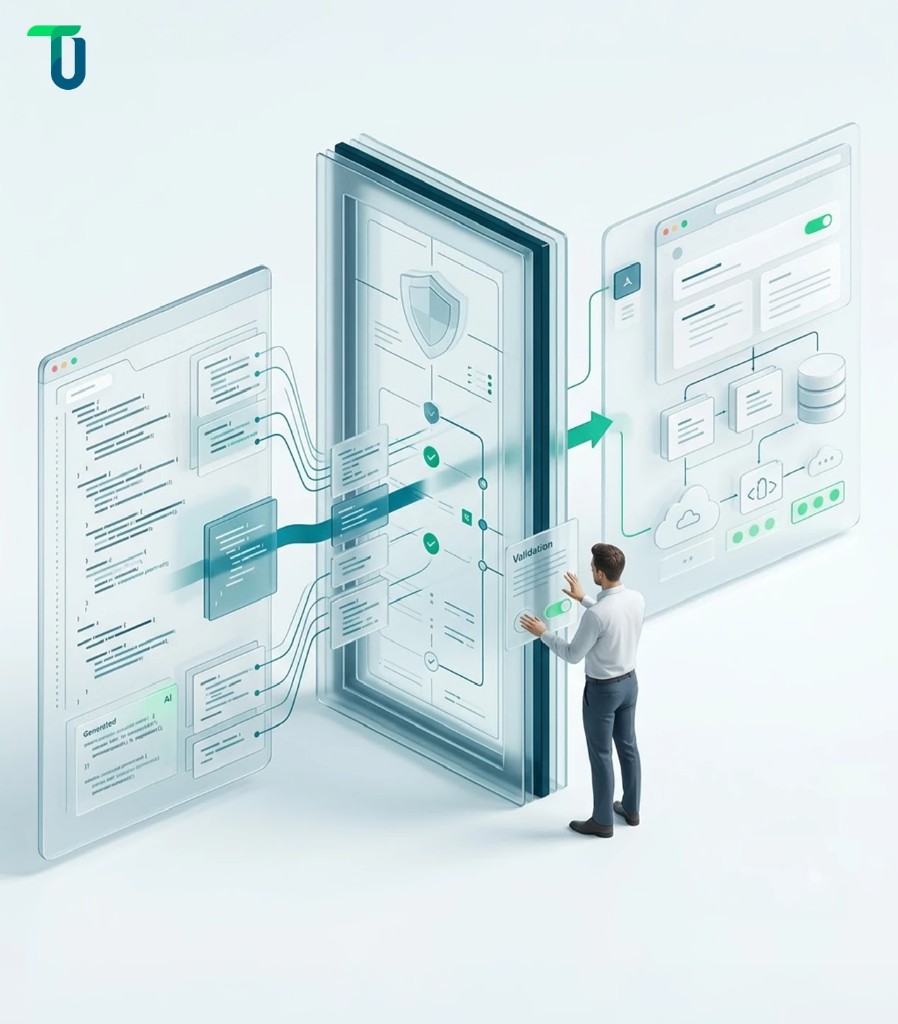
Vibe coding tools can all turn a sentence into a running application. Almost none of them tell you when to stop trusting what they built.
The market they sit inside is growing fast enough to explain the urgency: the broader AI code tools market was valued at $7.65 billion in 2025 and is projected to reach $22.2 billion by 2030, a 23.8% compound annual growth rate, according to The Business Research Company's Artificial Intelligence (AI) Code Tools Global Market Report.
That gap matters more in 2026 than it did a year ago. Vibe coding tools have moved from weekend side projects to boardroom conversations, and CTOs are now expected to have an opinion on Cursor, Lovable, Claude Code, and a dozen other vibe coding apps in the same breath. "Best vibe coding tools" is the wrong question. The right one is which category of tool fits what you're building, and when the output stops being a prototype and starts being software your business depends on.
This guide breaks vibe coding tools into the categories that matter for an enterprise buyer, walks through the codebase, security, and cost problems that surface after the demo ends, and lays out the specific signals that tell you when a prototype needs real engineering behind it.
What Are Vibe Coding Tools, and What Changed in 2026?
Vibe coding tools let you describe an application in plain language and get back working software, with an AI model handling most of the implementation. Andrej Karpathy coined the term in February 2025 to describe handing the keyboard to a model and steering by feel rather than syntax. Within a year, that description stopped applying to a narrow slice of the market and started covering nearly everything AI touches in software development, from lightweight editor plugins to full vibe coding platforms that run the entire stack.
Vibe coding tools are one branch of the broader AI coding tools 2026 conversation, sitting alongside pair-programming assistants and pure autocomplete plugins that never generate a whole application on their own.
TenUp's blog on Vibe Coding: The AI-Assisted Coding Revolution covers this shift in more depth, including the underlying tools and workflow mechanics.
What matters for a buying decision in 2026 is narrower. Vibe coding tools have moved well past autocomplete. The current generation:
- Plans multi-step work before touching a file
- Edits across multiple files at once
- Runs its own tests
- In some cases, deploys the result without a human touching a terminal
That shift is why the category now includes AI-native code editors, terminal agents, browser-based app builders, and enterprise platforms that generate internal tools from a prompt, all under the same label.
Prompt quality still drives output quality, even on the most autonomous tools. A vague instruction produces a generic result; a prompt that specifies the data model, the edge cases, and the acceptance criteria produces something closer to what a team actually needs on the first pass. Prompt engineering hasn't disappeared with agentic tooling. It has shifted from writing syntax to writing precise, testable specifications.
The practical consequence: two tools both called a "vibe coding tool" can solve completely different problems, for completely different users, with completely different risk profiles. The more useful question, and the one this guide is built around, is which category fits the job in front of you, and what happens once the first version works.
TenUp's 5-Point Vibe Coding Production Readiness Framework
TenUp Software Services evaluates any vibe coding tool, and any application built with one, across five dimensions before calling it production-ready: category fit, codebase awareness, security posture, total cost of ownership, and agent and governance compatibility. Each dimension gets its own deep dive later in this guide.
- Category fit. Does the tool match what you're building and who's building it? Covered in the categories section below.
- Codebase awareness. Can it hold context on a growing, existing repository without drifting? Covered under large codebases.
- Security posture. Does generated code get reviewed once, or scanned continuously as new risks emerge? Covered in the security checklist.
- True cost of ownership. What's actually being metered, and what does it cost past the initial demo? Covered in pricing and total cost of ownership.
- Agent and governance compatibility. Can another AI agent drive it, and does it inherit the right controls once production data is involved? Covered in building a stack and the MVE-to-MVP decision.
These five criteria carry different weight depending on who's evaluating.
- Founders and startups validating an idea weigh category fit and speed heaviest.
- Freelancers and agencies weigh codebase awareness and predictable per-project cost heaviest, since they're juggling multiple client codebases at once.
- Enterprise teams weigh security posture and governance heaviest, often before cost enters the conversation at all.
Know which of the three you are before you read the rest of this guide, since it changes which sections matter most.
Beyond this framework, this guide also covers a few practical extras worth knowing before you commit to a tool: how well each category fits your team's existing workflow, what's actually free to test before you pay, TenUp's own scored methodology and delivery experience applying this framework in production, and the habits that keep AI-generated code trustworthy after launch.
The Four Categories of Vibe Coding Tools (and Why the Category Matters More Than the Brand)
There is no single best vibe coding tool in 2026. The right choice depends on:
- What you're building
- What already exists
- Who will maintain the result
- What data it touches
- How much governance the work requires
Once you know which category you're actually shopping in, the shortlist inside it gets short fast.
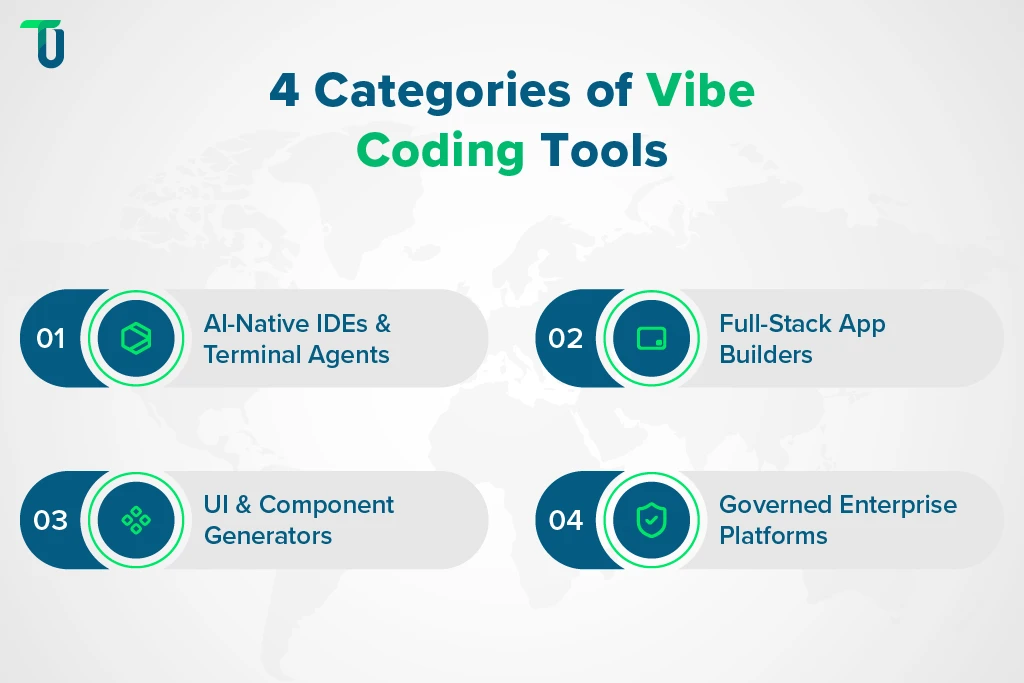
AI-Native IDEs and Terminal Agents
Tools like Cursor, Claude Code, Windsurf (rebranded Devin Desktop following Cognition's acquisition of the product), GitHub Copilot, and Codex sit inside or alongside a codebase you already have. You stay in control of architecture; the AI handles multi-file edits, refactors, and boilerplate. The right starting point when a repository already exists and a developer is driving.
Anthropic, for example, publishes its own SWE-bench Verified results for Claude models, a standard benchmark for how reliably a model resolves real GitHub issues. That's the kind of number worth checking directly against the vendor rather than a secondhand comparison, since methodology and model version both affect the result.
Full-Stack App Builders
Lovable, Bolt.new, and Replit Agent generate a complete application from a prompt, functioning as a no-code AI app builder: frontend, backend, database, and hosting included. There's no repository to bring; the tool creates one, though most either sync directly to GitHub or offer a one-time export, so you're not permanently locked into their runtime. Built for speed to a working demo, not for the assumption that a developer reviews every line before it ships.
UI and Component Generators
v0 by Vercel is the clearest example: it generates production-quality React and Tailwind components you drop into a project you already own. It deliberately doesn't manage a backend, a database, or deployment, which is exactly why it does the UI layer well.
Governed Enterprise App-Development Platforms
This category covers three approaches to vibe coding's speed without losing control over company data:
- Governance layered onto a SaaS platform teams already use, like monday vibe, so a generated app inherits existing permissions rather than creating a new attack surface
- Dedicated platforms built for governed app generation from the ground up, like Retool, with SSO, audit logs, and role-based access as defaults
- Established low-code vendors adding AI generation on top of infrastructure that already has version control and compliance checks built in, like OutSystems
Adjacent Category: Compliance- and Cloud-Ecosystem Coding Assistants
A related but distinct group sits alongside the four categories above: coding assistants built around a specific constraint rather than a workflow. Some, like Tabnine, are built for zero code retention and air-gapped deployment, for regulated industries where sending code to a third-party model is a non-starter.
Others, like Amazon Q Developer, are tuned for a single cloud ecosystem, surfacing suggestions based on an organization's own account context and infrastructure. Worth knowing if compliance or cloud lock-in is already a constraint, even though these aren't app builders in the vibe coding sense.
Match your starting point to a category:
- Rapid validation, no existing codebase: full-stack app builders
- An existing repository with a developer driving: AI-native IDEs or terminal agents
- UI-first work inside a project you already own: component generators
- Internal tools that need to inherit existing governance: governed enterprise platforms
- Regulated data or a single-cloud environment: compliance- or cloud-specific assistants
Picking the wrong category costs a rebuild, not a wasted prompt.
AI Coding Tools vs. an AI-Assisted Development Partner
AI coding tools create the software. They don't make sure it can actually be operated, secured, maintained, and scaled once real users depend on it. That's a separate job, covered later in this guide.
Rather than ranking these tools 1 through 14, the more useful move is matching each category to the project's production risk profile, which is what the rest of this guide walks through.
Vibe coding tools at a glance:
| Tool | Category | Best For | Code Ownership | Governance-Ready |
|---|---|---|---|---|
| Cursor | AI-Native IDE | Hardening code inside an existing repository | Yes | Enterprise tier |
| Claude Code | AI-Native IDE / Terminal Agent | Large, complex codebases needing deep context | Yes | Enterprise tier |
| Windsurf | AI-Native IDE | Agentic, multi-file execution with less hand-holding | Yes | Enterprise tier |
| GitHub Copilot | AI-Native IDE | Teams already standardized on GitHub | Yes | Enterprise tier |
| Codex | AI-Native IDE / Terminal Agent | Delegating scoped tasks inside the OpenAI ecosystem | Yes | Enterprise tier |
| Lovable | Full-Stack App Builder | Non-technical founders validating an idea fast | Yes | Business tier |
| Bolt.new | Full-Stack App Builder | Fastest path to a deployed browser-based demo | Yes | Enterprise tier |
| Replit Agent | Full-Stack App Builder | Beginners who want zero local setup | Yes | Enterprise tier |
| v0 by Vercel | UI/Component Generator | Frontend teams needing production-quality React output | Yes | Enterprise tier |
| monday vibe | Governed Enterprise Platform | Internal apps that inherit an existing SaaS's permissions | Platform-hosted | Built-in by default |
| Retool | Governed Enterprise Platform | Governed app generation with SSO and audit logs by default | Your infrastructure | Built-in by default |
| OutSystems | Governed Enterprise Platform | Enterprises with existing low-code governance maturity | Platform-hosted | Built-in by default |
| Tabnine | Adjacent / Compliance-First | Regulated industries needing zero code retention | N/A, assistant only | Built-in by default |
| Amazon Q Developer | Adjacent / Cloud-Native | Teams standardized on AWS | N/A, assistant only | Built-in by default |
Need to move an AI-generated prototype toward production?
TenUp helps enterprises turn validated AI-assisted prototypes into secure, scalable software built for real users, real data, and production requirements.
Which Vibe Coding Tools Handle Large Codebases Best?
Repo-aware tools that index your actual files handle large, growing codebases better than tools built to regenerate an app from scratch. Two factors decide how well any given tool holds up as a project scales: how much of the codebase it actually keeps in context, and how visible the logic it generates stays once you need to maintain it.
The Context-Window Problem
Cursor and Claude Code are the clearest examples of this working well: both index the actual repository rather than holding it loosely in a conversation. That distinction barely matters on a five-file prototype. It matters enormously once a project has grown past the point where a human can hold the whole thing in their head.
Codebase drift is what happens when an AI tool loses track of decisions it already made:
- A function gets duplicated because the model didn't notice one already existed
- A pattern established in one file gets contradicted in another
- Fix one bug, and two more appear where the fix wasn't supposed to touch
This is a direct consequence of how much of the codebase a tool actually holds in context, versus how much it's reconstructing from a compressed summary.
Tools built around a real repository, such as Cursor's codebase indexing or Claude Code's large context window, are designed specifically to reduce this. Full-stack builders like Bolt.new and Lovable are optimized for a different job: generating something new fast, not maintaining something large. Neither is a design flaw. They're built for different stages of the same project's life.
Workflow Transparency
A related, less-discussed factor is workflow transparency. Some full-stack builders generate business logic that stays visible and editable; others produce output that behaves like a black box, readable only by reading generated code you didn't write. For a team that will need to maintain, audit, or hand off the result, that visibility matters as much as raw output quality.
This is the point in a project's life where teams start paying twice: once to build the first version, and again to untangle what the tool built once nobody, including the AI, fully remembers why.
Codebase behavior at scale is one filter. How well a tool fits the team using it day to day is another, and it's just as easy to get wrong.
Team Collaboration, IDE Integration, and Language Support
How a vibe coding tool fits your team's existing workflow matters as much as what it generates. Three practical questions decide this.
Real-time collaboration
Replit and Bolt.new support multiple people editing the same project simultaneously, which matters for distributed teams iterating together. GitHub Copilot inherits GitHub's own pull-request and code-review workflow instead of building a separate collaboration layer. Enterprise platforms like Retool, OutSystems, and monday vibe treat multi-user workspaces as a default, not an add-on, since they're built for teams rather than individuals from day one.
IDE integration
Cursor and Windsurf are standalone editors built on a VS Code fork, meaning you switch tools entirely. GitHub Copilot and Codex instead plug into an editor you already use, including VS Code, JetBrains, and Vim, so nothing about your daily setup changes. Full-stack builders like Lovable, Bolt.new, Replit Agent, and v0 run entirely in the browser, with no IDE involved at all.
Language and framework support
Replit and GitHub Copilot support dozens of languages, which matters if your stack isn't JavaScript-first. v0 and Lovable are narrowly built around React and Next.js, which is a strength for teams already in that ecosystem and a limitation for anyone who isn't. Bolt.new supports several JavaScript frameworks beyond React, giving it more flexibility than the single-framework tools without matching Replit's full language breadth.
These three factors determine how much friction a team feels in week one. Workflow fit makes a tool easier to live with. It doesn't make the code it produces trustworthy, which is the next question.
The AI Code Security Checklist Vibe Coding Tools Won't Run For You
Vibe coding tools will not run a security review before shipping your app, and most won't tell you they skipped one. The vulnerabilities in AI-generated code follow a predictable pattern, and knowing that pattern is the fastest way to catch it before a user does.
The most common issues found in vibe-coded applications:
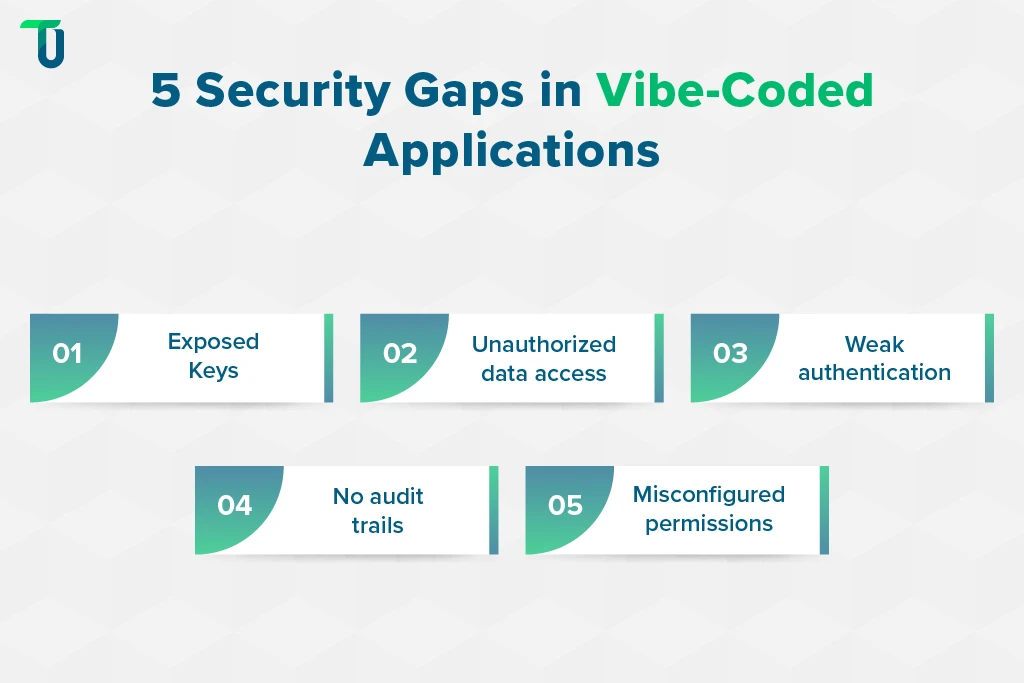
- API keys and secrets committed directly into generated code or exposed client-side
- Missing or incomplete authorization checks, where an authenticated user can access another user's data
- Weak authentication defaults, such as sessions that never expire or password rules the tool never asked about
- No audit trail for who changed what, which becomes a problem the moment a customer asks
- Misconfigured access controls on the database or storage layer the tool generated for you
Why a One-Time Review Isn't Enough
A one-time AI code review at the moment of generation catches some of this. It does not catch what happens six months later, when a dependency the tool installed gets a newly disclosed vulnerability, or a misconfiguration that was fine at launch becomes a real exposure as the app takes on more users and more data.
That's the core difference between a pull-request-level AI reviewer and continuous, repository-wide security scanning: one evaluates code at the moment it changes, the other keeps evaluating code that hasn't changed at all, because the risk around it has.
The Procurement Angle
For enterprises, this isn't only an engineering problem. It's a procurement question. A vendor or internal team that can point to a specific, repeatable security process, rather than "the AI reviewed it," is telling you something concrete about how they'll behave once your data is involved.
The market is already responding: several full-stack builders that started as pure prototyping tools now offer add-on security scanning or third-party penetration testing rather than leaving it entirely to the buyer.
TenUp's Take: AI-generated code should enter the same security lifecycle as human-written code, the same review gates, the same scanning, the same accountability. The fact that a model produced it doesn't change the organization's security responsibility for it.
TenUp's blog on How Vibe Coding Is Redefining Custom Software Development Services goes deeper into the CI/CD and DevSecOps pipeline work that turns this checklist into an enforced process rather than a one-time audit.
Security review debt behaves like technical debt with a shorter fuse. It doesn't show up in a demo. It shows up in an incident report, usually after the checklist above was skipped more than once.
Pricing and Total Cost of Ownership, Not Just the Sticker Price
The sticker price on a vibe coding tool's pricing page tells you less than the billing unit underneath it. Two tools priced at roughly the same monthly rate can produce different bills once you know what's actually being metered.
| Billing unit | How it behaves | What to watch for |
|---|---|---|
| Per-seat | Predictable per person, scales with headcount | Doesn't reflect how much any one person actually uses the tool |
| Credits | Bundled allowance, consumed at different rates per action | Complex actions, like adding authentication, often cost more credits than simple ones |
| Tokens | Charged by what the model reads and writes | Larger projects cost more per message, since more code gets sent to the model each time |
| Effort-based | Priced by the compute time a task actually takes | A single debugging session can cost more than the entire initial build |
The blind spot most teams miss isn't the rate. It's a default feature quietly consuming most of a project's budget without anyone asking for it. One documented build-in-public comparison tracked a Replit project where an automated testing feature, enabled by default, accounted for roughly three-quarters of the project's total spend, well above the cost of the actual application logic.
The right cost measure also changes depending on who's buying:
| User type | What drives ROI | Cost blind spot to watch |
|---|---|---|
| Founders and startups | Speed to a testable prototype | Credits burn fastest on debugging, not on the initial build |
| Freelancers and agencies | Predictable per-project cost across multiple clients | Per-seat pricing gets expensive fast across many small engagements |
| Enterprise teams | Cost per production-ready feature, not per seat | Governance and security controls often sit behind an enterprise tier the sticker price never mentions |
TenUp's blog on The Economics of Vibe Coding: What Enterprise Software Delivery Actually Costs goes deeper into the procurement side of this question, including how outcome-based pricing changes the calculation.
The number that should drive a buying decision isn't the monthly subscription. It's the cost per feature that's actually usable by a real customer three months later.
Free Tiers Worth Testing Before You Commit
Every major vibe coding tool offers some form of free access, and the differences between them are large enough to shape which one you evaluate first:
| Tool | Free tier limitation | Ideal use case for the free tier |
|---|---|---|
| Cursor | Limited completions before a seat is required | Testing whether the multi-file agent workflow fits your habits |
| Claude Code | Minimal access, not enough for sustained work | A first look at agentic terminal-based coding |
| GitHub Copilot | Premium model access reserved for paid tiers | Evaluating inline suggestions inside an editor you already use |
| Bolt.new | Daily token cap resets the allowance | Prototyping a small full-stack idea over a few sessions |
| Lovable | Small daily credit allowance | Validating a single idea, not iterating repeatedly |
| Replit Agent | Most real evaluation needs a paid plan | A first zero-setup prototype with hosting included |
| v0 by Vercel | Modest monthly credit allowance | Testing component quality before scaling usage |
| Windsurf | Basic completions only, agent features gated | Trying the editor experience before committing to Cascade |
| Tabnine | Zero-retention and air-gapped features reserved for paid tiers | Testing baseline code completion in a low-compliance context |
A free tier is the cheapest way to test the category-fit question from earlier in this guide before anyone signs a contract. Every free tier eventually hits a wall designed to convert you. Budget for that wall, not just the trial.
A free tier tells you whether a tool fits. It doesn't tell you whether what you build with it is ready for anyone but you to use.
The MVE-to-MVP Decision: When a Prototype Needs to Become Software
Most vibe-coded prototypes are not Minimum Viable Products (MVP). They're Minimum Viable Experiments (MVE), built to test whether an idea works, not to survive contact with real users, real data, and real compliance obligations. Confusing the two is where teams get into trouble, because an MVE and an MVP need to satisfy completely different bars.
The mistake is waiting for the prototype to fail before treating it differently. The better signal is a change in the project's risk profile, not a crash in production.
Signals a Prototype Has Crossed Into MVP Territory
- A second developer is joining the codebase
- A compliance or data-residency requirement has entered scope
- Multi-tenant data isolation is now a real requirement, not a hypothetical
- The first paying customer has arrived
- A security review, SOC 2, or ISO audit is now scheduled
- The prototype has become business-critical or revenue-generating, whether or not anyone planned for that
Any one of these should trigger a production-readiness conversation. Two or more, and that conversation is already overdue.
TenUp's Take: The riskiest prototypes aren't the ones that look unfinished. They're the ones that already look polished enough that nobody questions what's underneath, until a customer, an auditor, or a second developer forces the question.
What "Production-Ready" Actually Means
Measured rather than assumed:
- Requirements are documented and testable, not held in a chat history
- Authentication and authorization are deliberately designed, not defaults the tool picked
- Tenant data isolation is verified through testing, not assumed from the architecture diagram
- Secret rotation and vault management have a named owner, not a one-time setup step
- Dependency and vulnerability scanning runs on a schedule, with someone accountable for acting on new findings
- Tests run in CI/CD on every change, not manually before a demo
- Changes are reviewable and traceable, with a record of who approved what
- Logs, metrics, and alerts exist before an incident, not after one
- Rollback and recovery procedures are defined and tested
- The system has an accountable owner, not just an original prompt author
TenUp's own delivery work reflects this directly, detailed in full in the real-world example below.
TenUp's blog on How AI-Assisted Development Changes Enterprise Software Delivery covers the vendor-evaluation side of this transition in more depth, including what to ask a development partner before handing them a prototype.
The transition from MVE to MVP isn't a failure of vibe coding. It's the point where the tool has done its job, validating the idea, and a different kind of work needs to take over.
Building an AI Coding Stack Instead of Picking One Tool
No single vibe coding tool covers the full lifecycle of a real product, and teams that try to force one to are usually the ones stuck untangling it later. The right stack also looks different depending on who's building.
For Startups and Founders
- Validate the idea in a full-stack builder like Bolt.new or Lovable, prioritizing speed over polish
- Get real user feedback before touching the underlying code
- Bring in an AI-native editor like Cursor or Claude Code only once the idea is validated and worth hardening
For Freelancers and Agencies
- Standardize on one full-stack builder across client projects to keep pricing and workflow predictable
- Use an AI-native editor for the client engagements that need custom logic a builder can't generate cleanly
- Keep a governed platform like Retool in the stack for any client project touching their production data
For Enterprise Teams
- Route internal-tool requests to a governed enterprise platform first, so permissions and audit logs are inherited automatically
- Reserve full-stack builders for disposable prototypes, not anything headed toward production
- Standardize on an AI-native editor for engineering teams hardening and maintaining what gets kept
A Newer Consideration: Agent and MCP Compatibility
Whether a tool exposes an API or an MCP server that another AI agent can drive directly, rather than requiring a person to click through a browser interface for every build, is starting to matter for teams running multiple projects at once. Google's Antigravity, for example, was built around this kind of agent-orchestrated workflow when it entered public preview. As with most fast-moving products in this space, availability and pricing are worth confirming directly before planning around it.
None of this changes the fundamental math. If the plan assumes one tool and one seat, the budget and headcount plan built around that assumption will be wrong within two quarters. Plan for a stack, and the tool-selection question in this guide gets easier, because no single answer has to be the right one for every stage.
TenUp's Vibe Coding Production Readiness Scorecard
The production-readiness checklist earlier in this guide tells you what to look for. TenUp's Production Readiness Scorecard puts a number on it, so different stakeholders, engineering, security, and the business side, can agree on how close an application actually is to launch, instead of arguing from different assumptions about what "done" means.
| Dimension | Weight | What TenUp evaluates |
|---|---|---|
| Architecture | 20% | Maintainability, modularity, technical debt |
| Security | 25% | Authentication, authorization, secrets management, vulnerabilities |
| Scalability | 20% | User load, data volume, infrastructure, performance |
| Codebase quality | 15% | Documentation, test coverage, dependency health |
| Governance | 20% | Ownership, CI/CD maturity, auditability, compliance |
Each dimension is scored, weighted, and summed into a single readiness score out of 100:
- 0-40: Prototype only
- 41-60: Needs engineering intervention
- 61-80: Approaching production
- 81-100: Production-ready with ongoing controls
This is TenUp's internal assessment framework, applied during code and architecture reviews, not an industry-standard certification. Its value isn't the specific number; it's that it forces a concrete conversation about which of the five dimensions is actually holding a project back, instead of a vague sense that it "isn't ready yet."
Real-World Example: How TenUp Used Vibe Coding in Production
Vibe coding and engineering discipline aren't opposites. In a recent workflow automation engagement for a US-based distributor, TenUp used both together to automate two manual, error-prone processes without the usual production risk.
Challenge: The client's sales and accounting teams relied on manual work to identify new leads and reconcile customer payments, a process that was slow, error-prone, and increasingly difficult to scale as data volume grew.
Approach: TenUp built the automation on n8n, using Cursor connected through MCP servers to accelerate workflow creation, AI-assisted logic generation, regression testing, and debugging.
What AI accelerated: Workflow creation, logic generation, regression testing, and debugging work that would otherwise have consumed significantly more developer time.
What engineering controlled: Code reliability and QA standards were maintained throughout the build, specifically addressing vibe coding's known production limitations before any workflow went live.
Results: 60% faster lead identification and 75% faster payment reconciliation, across two core processes automated end to end, with production stability maintained throughout.
Lesson: Vibe coding accelerated implementation. Engineering discipline made the result production-ready. Neither one alone would have gotten this client to a stable, deployed system.
See the full engagement in TenUp's case study on AI workflow automation through vibe coding and agentic AI.
What TenUp Has Learned From Vibe Coding in Enterprise Software
Across the 18 AI-assisted engagements TenUp has shipped using this approach, a few conclusions hold up consistently:
- Speed is highest during validation, not necessarily during production delivery. The two phases have different goals and shouldn't be measured against the same clock.
- Security debt accumulates faster than most teams expect, quietly, until an audit or an incident forces the question.
- Codebase ownership becomes critical the moment a second engineer joins, not before.
- The right tool depends on the project's risk profile, not on which one is trending.
- AI-generated code still requires the same engineering controls conventional code does. The fact that a model wrote it doesn't change who's accountable for it.
- The transition from MVE to MVP should be triggered by a change in risk, not a failure in production.
- AI coding tools work best as accelerators inside an engineering process, not as a replacement for one.
None of this is a case against vibe coding. It's the difference between using it well and using it carelessly.
Human-in-the-Loop: Best Practices for Combining AI and Engineering Judgment
TenUp's scorecard, covered earlier in this guide, measures whether an application is ready at a single point in time. The habits below keep it that way after launch, as the tool, the model, and the codebase all keep changing.
- Treat AI output as a first draft, not a final answer, regardless of how clean it looks
- Keep a named human owner accountable for every merge, not just an approval checkbox in a workflow
- Review AI-generated logic the way you'd review a junior engineer's pull request, line by line, not just by running the app and confirming it works
- Use AI to accelerate the mechanical parts of engineering, and keep human judgment on the architectural decisions
- Re-run this discipline every time a model or tool version changes, since output behavior shifts with each update
Teams that skip this discipline aren't saving time. They're deferring the review to whoever discovers the problem first, usually a customer, an auditor, or the engineer who inherits the codebase next.
How to Choose a Vibe Coding Development Partner
Not every development partner who says they do AI-assisted development has actually operationalized it. Eight questions separate the ones who have from the ones repeating a marketing line:
| Criterion | What to ask |
|---|---|
| AI development experience | Have you shipped AI-assisted applications to production, not just prototypes? |
| Code audit capability | Can you assess and safely modify an AI-generated codebase you didn't write? |
| Security validation | How do you validate generated code beyond a one-time AI review? |
| Architecture ownership | Who owns technical architecture decisions once speed stops being the priority? |
| Testing discipline | What automated testing runs on every change, not just before a demo? |
| Cloud and infrastructure | How is production infrastructure designed, and by whom? |
| Governance after launch | Who owns the application after launch, and how is that tracked? |
| Modernization approach | Can you refactor what's worth keeping, rather than defaulting to a full rebuild? |
For enterprises, the right partner isn't the company that generates the most code. It's the team that can tell you which AI-generated code is worth keeping, what needs to be redesigned, and how to get the result production-ready. Certifications like ISO 27001 and cloud partnerships like AWS Partner status won't answer any of these eight questions directly, but they're a reasonable signal that governance infrastructure already exists at that partner, rather than getting built for the first time on your project.
Choosing Vibe Coding Tools Is the Easy Part
Vibe coding tools have changed how fast an idea can become something a user can click through. What they haven't changed is the amount of engineering judgment required before that idea can safely handle real customers, real data, and real regulatory scrutiny. Just as there's no single best vibe coding tool, there's no single best AI coding assistant for every situation, only the one that fits what you're building. Three things this guide argues for instead:
- The category matters more than the brand
- The billing unit matters more than the sticker price
- The transition from prototype to production is a risk-profile decision, not a reaction to something breaking
TenUp's position is simple: vibe coding should accelerate software delivery, not remove engineering accountability. That discipline is behind the 18 AI-assisted engagements TenUp has already shipped this way.
Choosing the right vibe coding tool gets a team to a working demo. Getting from there to software the business can actually run on is a different job, and it's the one where TenUp specializes.
As an ISO 27001-certified company and an AWS Partner, TenUp's AI-assisted software development services help enterprises take vibe-coded prototypes through the exact production-readiness signals covered in this guide, without discarding the speed that got them there in the first place.
Have a vibe-coded prototype that's starting to matter?
TenUp's engineering team can assess where it stands against the production-readiness signals above and build the roadmap to get it there.
Frequently asked questions
What are vibe coding tools?

Vibe coding tools let you describe an application in natural language and receive working software back, with an AI model handling most of the code generation, testing, and often deployment. The category spans AI-native editors, browser-based app builders, UI generators, and governed enterprise platforms, each suited to a different starting point and risk tolerance.
Is vibe coding safe for production code?
Only when the output goes through the same security, testing, and review discipline any other code would require, including authorization checks, secrets management, and continuous dependency scanning. Shipping an AI-generated prototype to real users without that review is the most common way vibe-coded applications fail in production.
What's the best vibe coding tool for a SaaS MVP?
There's no single best tool; it depends on what you're building and who's building it. A non-technical founder validating an idea is usually better served by a full-stack builder like Lovable or Bolt.new, while a technical founder with an existing repository gets more from an AI-native editor like Cursor or Claude Code.
How do vibe coding tools handle large or growing codebases?
Tools built around indexing a real repository, such as Cursor and Claude Code, handle large codebases better than tools that regenerate an application in place, since they reference actual files instead of reconstructing context from a summary. That gap widens once a project outgrows what full-stack builders like Bolt.new or Lovable were designed to maintain.
Vibe coding vs. traditional development: what are the real trade-offs?
Vibe coding trades architectural control for speed and lower upfront cost, with a higher risk of unreviewed security and scalability issues. Most enterprise teams use both: vibe coding to validate an idea fast, engineering discipline to harden what's worth keeping.
What should enterprises look for in a partner to take a vibe-coded prototype into production?
A partner who treats vibe coding as an accelerator within a governed development process, not a replacement for one, and who can point to a specific, repeatable QA and security process rather than "the AI reviewed it." Certifications like ISO 27001 and cloud partnerships like AWS Partner status are useful signals that governance infrastructure exists beyond the tool itself.
Will vibe coding tools replace software engineers?
No. Vibe coding tools shift where engineers spend their time, from writing boilerplate to reviewing, architecting, and hardening AI-generated output, but they haven't eliminated the need for engineering judgment. Even the tools generating the most code still can't decide what should be built, verify that it's secure, or take accountability when something breaks in production.
What is the best AI coding assistant in 2026?
Within the AI-native IDE category, Cursor leads for deep multi-file editing and model flexibility, Claude Code for reasoning across large, complex codebases, Windsurf for agentic execution with less manual back-and-forth, and GitHub Copilot for teams that want assistance without leaving their existing editor. The best depends on whether you value editor familiarity, raw context window size, or how autonomously you want the agent to work.
What's the best vibe coding tool for full-stack development?
Full-stack app builders like Lovable, Bolt.new, and Replit Agent generate a frontend, backend, database, and hosting from a single prompt, making them the fastest path to a complete application. For full-stack work inside an existing, larger codebase, an AI-native editor like Cursor or Claude Code is the stronger fit, since it can reason across a project a builder wasn't designed to inherit.
Share the Article


