


Modern companies deal with fast growth, large data sets, distributed teams, and pressure to ship faster. Off-the-shelf products help in the early stage, but they rarely support long-term scale. This gap pushes enterprises to move toward custom enterprise software development. It gives full control over workflows, integrations, governance, automation, and security. Every business has its own logic and rules. Custom enterprise systems match that reality. In this blog, we explore 10 important types of enterprise software that companies across industries adopt. You will also see benefits, key factors to consider, and practical advice that reflects real conversations from founders, CTOs, and technical managers.
What Is Custom Enterprise Software Development?
Custom Enterprise Software Development is the process of designing, building, and maintaining software that is uniquely tailored to an organization’s workflows, data structure, security needs, and long-term growth plans.
Unlike off-the-shelf tools, it gives enterprises full control over features, integrations, automation, and data governance.
Key Benefits
- Built around your operations: Every feature matches real business processes.
- End-to-end lifecycle: From discovery and architecture to deployment and ongoing optimization.
- Scalable & secure: Supports enterprise workloads with advanced security and compliance.
- Seamless integrations: Connects smoothly with CRMs, ERPs, legacy systems, and cloud platforms.
- Complete ownership: No vendor limits; the organization controls the roadmap and IP.
The result: faster operations, stronger scalability, and a long-term competitive advantage.
Why Do Modern Enterprises Choose Custom Software?
Modern enterprises need custom software to handle unique workflows, integrate systems, and scale operations efficiently. In many cases, teams begin by comparing ‘buy vs build.’ Off-the-shelf tools offer speed, but fall short in customization and long-term ownership, while custom development provides control, deeper integrations, and future-proof scalability. Here are the 5 key reasons why they choose custom solutions.
1. To Fix Gaps That Off-the-Shelf Tools Cannot Handle
Off-the-shelf software may lack features critical for unique operations. Enterprises often face constraints in workflows, reporting, or integrations. Custom enterprise software development fills these gaps, delivering tailored modules and seamless interoperability with existing systems like ERP, CRM, and legacy apps.
2. To Match Workflows Unique to Their Operations
Every enterprise has processes shaped by industry, scale, and strategy. Custom software development for enterprise allows workflows to mirror internal practices, from multi-branch approvals to specialized HR or billing processes. This reduces workarounds and aligns systems with real operational needs.
TenUp's Take: Focus on workflow first. Map out how your teams operate daily before choosing or building software.
3. To Integrate Smoothly With ERP, CRM, and Legacy Apps
Integration challenges slow decision-making and causes data silos. End-to-end custom software development for large enterprises ensures smooth connectivity with ERP modules, CRM platforms, and legacy applications. APIs and data connectors enable unified data flow across all departments.
4. To Remove Vendor Lock-In and Control Long-Term Costs
Proprietary software can trap companies into recurring fees, restrictive licenses, and unpredictable SLAs. A custom enterprise software development company builds solutions that provide full code ownership, flexible scaling, and predictable support costs, reducing long-term financial risks—making it essential to hire custom enterprise software developers who understand enterprise scaling needs.
5. To Scale Systems as Teams and Data Volumes Grow
Enterprises experience rapid growth in users, transactions, and data. Custom enterprise software development USA focuses on scalable architecture that accommodates increased workloads, supports distributed teams, and allows future expansions without disrupting ongoing operations.
Also Read: Custom AI Software Development: A Guide to Building Intelligent Solutions
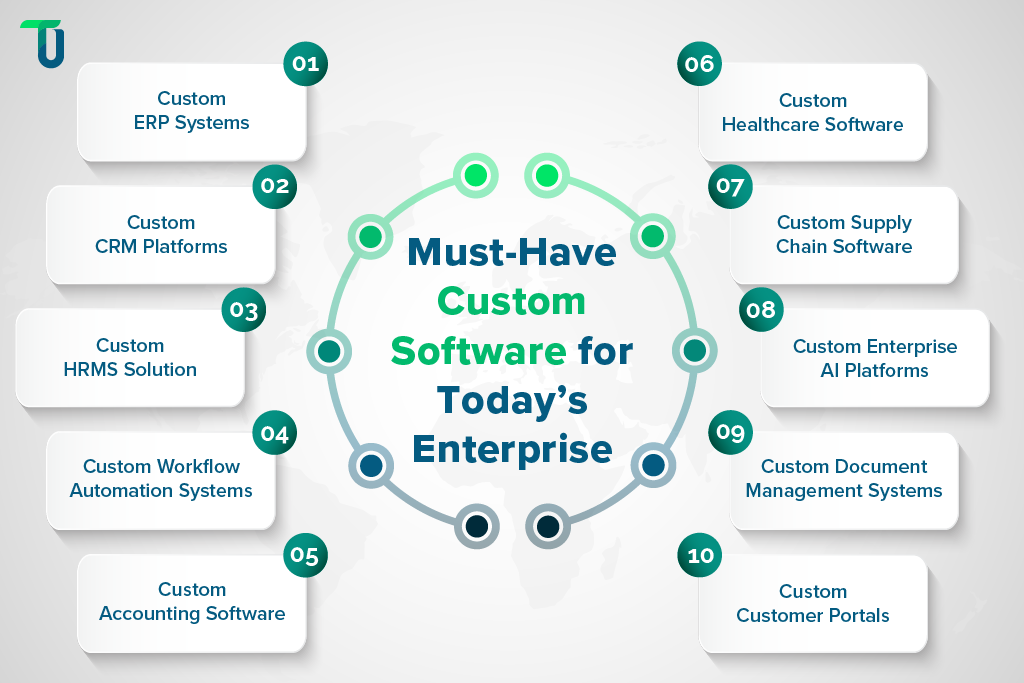
Top 10 Custom Enterprise Software For Modern Companies
The below listed are the most useful custom enterprise software types for modern companies. Let's take a closer look at what they do and where they fit in your business.
1. Custom ERP Systems
A custom ERP centralizes workflows across finance, supply chain, inventory, sales, HR, and projects. Many enterprises choose custom ERP development using microservices when off the shelf tools restrict unique operations. A custom ERP adapts to industry workflows and handles complex system integrations with existing CRMs, DMS platforms, or legacy systems.
Key Benefits of Custom ERP Systems
- Gives unified visibility across all departments and processes
- Removes data silos by replacing scattered tools and platforms
- Supports deep customization for industry specific workflows
- Enables faster decisions through real time dashboards
- Scales easily for new modules, teams, and business units
Factors to Consider When Choosing a Custom ERP System
- Data migration scope
- Integration with existing CRM
- Custom workflow needs
- User training requirements
- Role based access
- Long term maintenance
Common Use Cases of Custom ERP Systems
- Inventory and warehouse automation
- Financial tracking and billing
- Procurement and vendor workflows
- Production planning and scheduling
- Multi location reporting
Ideal For
Large enterprises, manufacturers, retail chains, logistics companies, and businesses with complex processes.
Still patching gaps between your ERP, CRM, and internal tools?
TenUp Software Services helps unify systems with custom software built for seamless integration.
2. Custom CRM Platforms
A custom CRM helps companies manage leads, customer communication, tickets, sales pipelines, and account insights. Organizations in the property sector often rely on Real Estate Software Development Services to build tailored CRM platforms that streamline property listings, agent collaboration, and client management. Many teams prefer custom CRM development when standard CRMs do not match sales processes or integration needs with internal ERPs or data platforms.
Key Benefits of Custom CRM Platforms
- Matches internal sales cycles and required deal workflows
- Connects with ERP, billing, and marketing tools smoothly
- Automates routine tasks to reduce manual entry work
- Improves customer experience with unified interaction history
- Supports strict security for sensitive data and industries
Factors to Consider When Choosing Custom CRM Platforms
- Integration with ERP
- Pipeline customization
- API access
- Data privacy needs
- Report automation
- Onboarding process
Common Use Cases of Custom CRM Platforms
- Lead tracking
- Deal forecasting
- Ticketing
- Customer lifecycle mapping
- Account level revenue planning
Ideal For
Sales teams, service teams, distributed support operations, and companies with long customer cycles.
3. Custom HRM and Workforce Management Software
Enterprises with large teams need HRM platforms that cover hiring, onboarding, attendance, payroll, compliance, and performance reviews. Custom HRM software supports rules for regions, roles, shifts, overtime, and approvals that off the shelf systems cannot handle well.
Key Benefits of Custom HRM Software
- Handles hiring, onboarding, shifts, and approvals smoothly
- Tracks employee lifecycle with accurate HR and payroll data
- Reduces admin load with alerts and automated workflows
- Integrates HR modules with finance and identity systems
- Supports large and distributed teams effortlessly
Factors to Consider When Choosing Custom HRM Software
- Payroll rules
- Region wise compliance
- Attendance device links
- Data protection
- Third party tools
- Shift planning needs
Common Use Cases of Custom HRM Software
- Hiring and onboarding
- Attendance and leave
- Payroll and compliance
- KPI tracking
- Document vaults
Ideal For
Enterprises with large teams, multi location operations, manufacturing units, healthcare networks, and HR heavy environments.
4. Custom Workflow Automation Systems
Workflow automation tools replace repetitive manual tasks. Enterprises use custom workflow systems for approvals, SOP compliance, document flows, vendor management, and internal process automation, with specialized solutions such as Moving Company Software helping streamline complex moving and move-management workflows. Custom development gives teams full control over rules, branching logic, and role based access.
Key Benefits of Workflow Automation Systems
- Removes repetitive steps across multi stage workflows
- Supports dynamic rules suited for complex enterprise processes
- Integrates with ERP, CRM, DMS, and legacy systems easily
- Ensures process visibility with tracking and reminders
- Offers secure access control for large team structures
Factors to Consider When Choosing Custom Workflow Automation Systems
- Number of workflows
- Integration depth
- Compliance rules
- Mobile access
- SLA tracking
- User roles
Common Use Cases of Custom Workflow Automation Systems
- Approvals
- SOP compliance
- Vendor onboarding
- Multi branch workflows
- Internal task routing
Ideal For
Large enterprises, regulated sectors, procurement heavy teams, and companies with high workflow complexity.
5. Custom Finance, Billing, and Accounting Software
Financial systems often require strict validation, region wise rules, audit trails, and deep integration with enterprise ERPs. Custom finance and billing software supports advanced pricing models, recurring billing, multi currency setups, and automation that generic tools cannot handle.
Key Benefits of Custom Accounting Software
- Handles complex pricing, taxes, and multi currency rules
- Offers strong validation and audit trails for compliance
- Connects with ERP, banks, and payment systems
- Automates invoices, reminders, and recurring billing
- Reduces manual errors across financial operations
Factors to Consider When Choosing Accounting Software
- Regulation rules
- Integration scope
- Pricing logic
- User roles
- Audit checks
- Data security
Common Use Cases of Accounting Software
- Invoicing
- Revenue tracking
- Expense management
- Subscription billing
- Financial consolidation
Ideal For
Finance teams, multi branch enterprises, subscription based businesses, and regulated industries.
Recommended Article: Cloud Application Development with Microservices: A Complete Guide
6. Custom Healthcare Software and EMR Systems
Healthcare providers rely on custom enterprise software development for EMR systems, patient management, telehealth, lab integrations, and custom workflows. Standard tools often fail to match specialty workflows, security rules, and multi center setups.
Key Benefits of Custom Healthcare Software
- Supports clinical workflows with accurate medical records
- Connects EMR with imaging, pharmacy, and billing units
- Complies with healthcare data and privacy requirements
- Integrates with labs, devices, and insurance systems
- Reduces admin load and enhances patient experience
Factors to Consider When Choosing Custom Healthcare Software
- Data privacy
- Clinical workflows
- Device integration
- Staff training
- Audit logs
- Interoperability
Common Use Cases of Custom Healthcare Software
- EMR
- Patient portals
- Telehealth
- Lab reports
- Hospital workflows
Ideal For
Hospitals, clinics, diagnostic centers, and healthcare networks.
7. Custom Supply Chain and Logistics Software
Enterprises with complex distribution networks use custom supply chain software for planning, routing, tracking, and optimization. Custom development supports multi-warehouse operations, carrier rules, compliance forms, and predictive analytics powered by solutions like AI software for warehouse management.
Key Benefits of Supply Chain Software
- Tracks goods across warehouses, fleets, and carriers
- Optimizes routes and forecasts needs with AI insights
- Integrates with WMS, ERP, and fleet systems
- Reduces losses through alerts and exception tracking
- Supports multi region logistics and compliance rules
Factors to Consider When Choosing Supply Chain Software
- Route logic
- Integration with WMS
- Device tracking
- Compliance forms
- Inventory rules
- Geographic scale
Common Use Cases of Supply Chain Software
- Routing
- Inventory
- Fleet tracking
- Dispatch planning
- Warehouse operations
Ideal For
Logistics companies, manufacturers, retail chains, and businesses with large inventory flows.
8. Custom Enterprise AI Platforms
Companies use AI-driven platforms for forecasting, quality control, automation, support, and decision intelligence — often powered through Enterprise AI software development services. Custom enterprise level AI software development helps create models trained on internal data and connected with existing systems.
Key Benefits of Enterprise AI Platforms
- Automates tasks like ticket sorting and document checks
- Helps forecast demand and detect anomalies quickly
- Integrates AI models into ERP and CRM workflows
- Provides insights with dashboards and predictive tools
- Reduces manual checks and speeds up processes
Factors to Consider When Choosing Enterprise AI Platforms
- Data quality
- Model training
- Integration scope
- Bias checks
- Access control
- Audit logs
Common Use Cases of Enterprise AI Platforms
- Forecasting
- Ticket automation
- Document analysis
- QA automation
- Operational insights
Ideal For
Large enterprises, data heavy organizations, support teams, finance units, and compliance driven sectors.
9. Custom Document Management Systems (DMS)
Enterprises handle thousands of documents across teams. A custom DMS helps manage storage, versioning, approvals, classification, and access control. Similar capabilities are delivered through Art Storage Management Software, enabling organizations to maintain accurate records, asset histories, and operational visibility across storage facilities. It supports integration with ERP, CRM, HRM, and workflow tools.
Key Benefits of Documents Management Systems
- Organizes documents with quick search and classification
- Tracks versions and permissions for strict compliance
- Integrates with HR, vendor, and workflow systems
- Automates routing for recurring document tasks
- Protects sensitive files with role based access
Factors to Consider When Choosing A Documents Management System
- Access rules
- Storage size
- Workflow needs
- Integrations
- Version control
- Search features
Common Use Cases of Documents Management Systems
- Vendor files
- Employee documents
- Contracts
- Compliance records
- Project files
Ideal For
Enterprises with heavy documentation, regulated companies, HR teams, finance teams, and multi site operations.
10. Custom Customer Portals and Self Service Platforms
Enterprises build portals for customers, vendors, distributors, and partners. Custom portals offer secure access to data, transactions, orders, payments, documents, support, and workflows based on user roles.
Key Benefits of Customer Portals
- Gives external users access to orders, billing, and support
- Reduces support load through automated self service tools
- Connects with ERP, CRM, finance, and WMS systems
- Adds transparency through real time status tracking
- Supports multi tenant access with strict security rules
Factors to Consider When Choosing a Customer Portal
- Access control
- UI simplicity
- ERP integration
- Response time
- User onboarding
- Data security
Common Use Cases of Customer Portals
- Customer portals
- Vendor portals
- Distributor dashboards
- Service centers
- Payment portals
Ideal For
Enterprises with large partner networks, B2B businesses, service organizations, and operations with recurring customer touchpoints.
How Custom Enterprise Software Fits Into Digital Transformation?
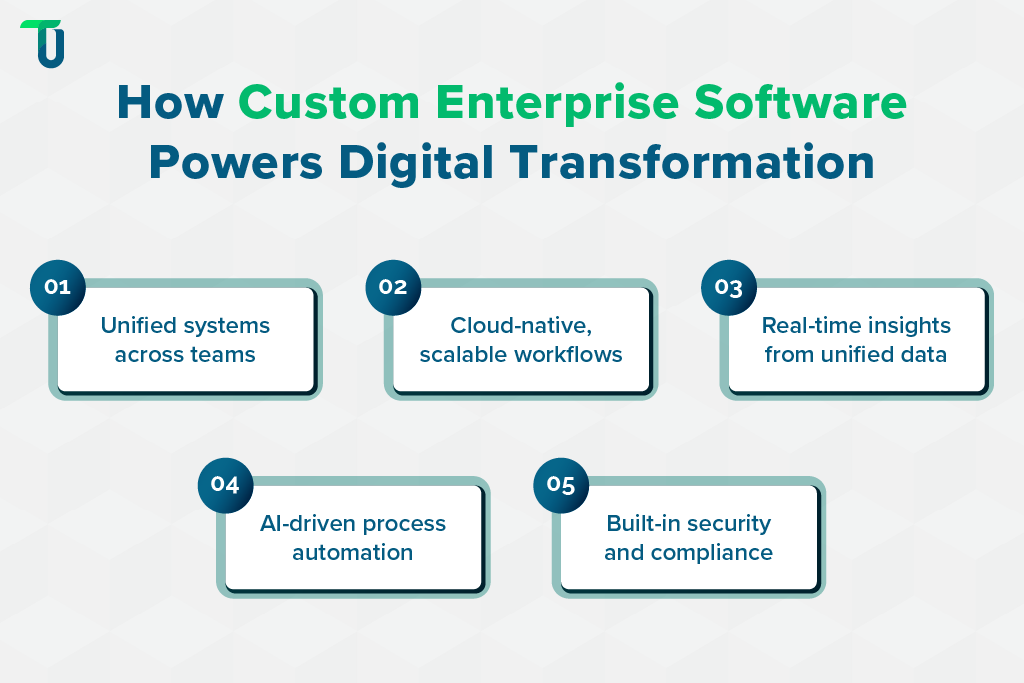
Custom enterprise software development helps modern companies connect systems, automate operations, and transform workflows. Here are the five key ways it drives digital transformation.
1. Connecting Systems Across Teams
Custom software links ERP, CRM, HRM, and billing systems through APIs and data connectors. Teams access a single source of truth for operations, finance, and customer data. This reduces duplicate work, prevents errors, and improves collaboration across departments, creating smoother workflows.
2. Shifting Workflows to Cloud Native Apps
Legacy system modernization to cloud-native enterprise apps allows enterprises to run flexible, scalable, and secure operations, which often requires a shift in enterprise application architecture models. Teams can access tools remotely, support multi-location operations, and reduce infrastructure bottlenecks. Cloud-native apps support continuous updates without disrupting business.
3. Enhancing Decisions With Unified Data
Custom enterprise software development consolidates data from multiple sources. Decision-makers get real-time insights from dashboards and reporting tools. Enterprises can track KPIs, spot trends, and allocate resources efficiently while maintaining data integrity across platforms.
4. Automating Operations With AI Tools
Enterprise AI development & custom software solutions automate repetitive tasks such as invoice processing, ticket routing, or compliance checks, demonstrating how AI is changing IT outsourcing across modern enterprises. AI modules integrate with ERP and CRM systems, accelerating workflows, reducing errors, and freeing teams to focus on strategic tasks.
5. Strengthening Compliance and Access
Custom solutions enforce role-based access, audit trails, and industry-specific compliance rules. For instance, TenUp’s custom-built AI-powered watchlist screening solution can identify high-risk entities and ensure regulatory compliance. This protects sensitive data, meets regulatory standards, and reduces risks during internal audits or third-party inspections. Enterprises maintain secure and controlled operations across departments.
In addition to these major benefits, custom enterprise software development also supports scalable growth, simplifies integrations, and strengthens long-term operational efficiency.
Related Reads:
Challenges and Risks Enterprises Must Plan For
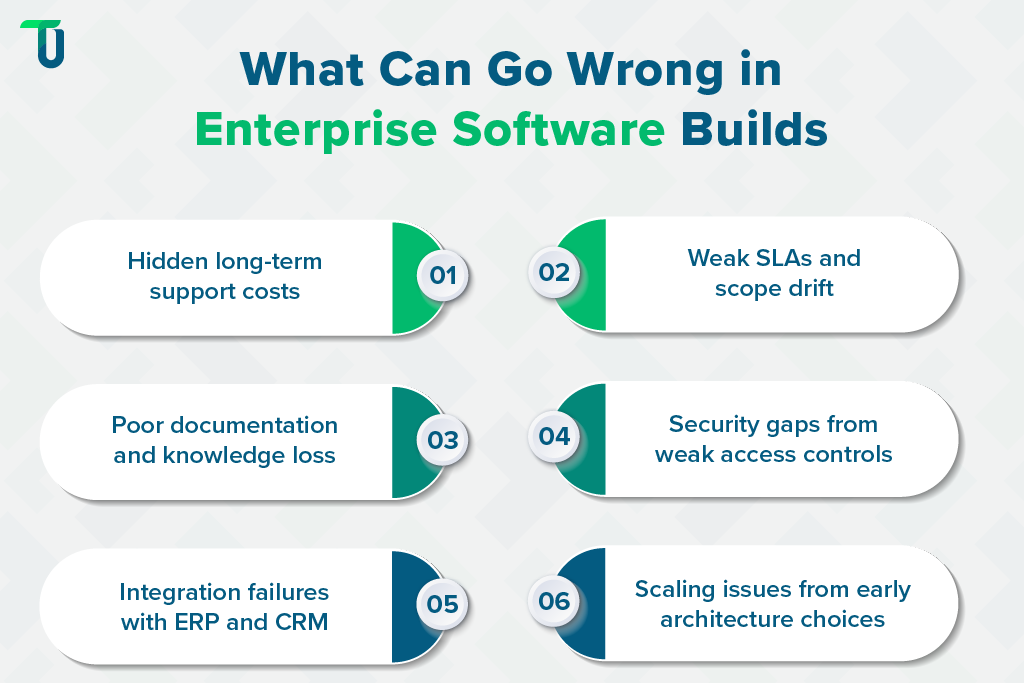
Enterprises often face unexpected issues during custom enterprise software development. Here are some common challenges and ways to address them effectively:
1. Hidden Support Costs and Unclear Long-Term Expenses
Custom enterprise software projects can incur ongoing support fees, unplanned upgrades, or third-party subscriptions. These costs often exceed initial estimates, affecting budgets and ROI if not clarified upfront before starting development.
How to Address:
- Review vendor contracts for recurring costs and upgrade fees
- Include clear SLAs for support and maintenance
- Budget for long-term expenses and platform evolution
- Prioritize vendors with transparent pricing for custom enterprise software development
2. Weak SLAs Leading to Delivery Delays and Scope Drift
Poorly defined service agreements can result in missed deadlines, ambiguous deliverables, or expanding project scope.
How to Address:
- Define measurable milestones and timelines
- Set clear acceptance criteria for each deliverable
- Include penalties or incentives in SLA agreements
- Partner with top enterprise custom software development companies
3. Poor Documentation Causing Knowledge Loss
Insufficient technical documentation creates problems when new developers join or vendors leave. Teams struggle to understand workflows, fix bugs, or maintain integrations. This leads to delays and inefficiencies in enterprise software operations.
How to Address:
- Require detailed handover documents for all modules
- Maintain API references, data schemas, and architecture notes
- Implement internal developer onboarding and knowledge retention practices
- Track changes and maintain versioned documentation
4. Security Gaps from Inconsistent Access Controls
Custom applications may have weak role-based permissions, missing audit logs, or inadequate encryption. Security gaps leave enterprises exposed to data breaches, compliance issues, and operational risks.
How to Address:
- Conduct security audits and penetration testing
- Implement strict role-based permissions and encryption
- Monitor logs and automate alerts for suspicious activity
- Partner with a top custom enterprise level AI software development company
5. Integration Issues with Existing ERP and CRM Tools
Custom software may not connect properly with legacy ERPs, CRMs, or billing platforms, causing workflow interruptions — a risk easily avoided with custom ERP development services.
How to Address:
- Map existing workflows and dependencies before development
- Use APIs or data connectors for seamless integration
- Plan for iterative testing with ERP and CRM systems
TenUp's Take: Maintain thorough documentation and clear role-based access. It minimizes knowledge loss, improves security, and keeps new team members productive while reducing operational risks.
6. Scaling Problems from Weak Early Architecture Choices
Software built without scalable architecture struggles as users, data, or features grow. Weak initial design creates slow performance, rigid modules, and expensive rework.
How to Address:
- Build modular, cloud-native architecture for scalability
- Conduct performance testing and stress simulations
- Plan for future feature additions and user growth
To summarize, enterprises can effectively overcome these challenges by following the best practices listed above and consulting the best software development agencies for custom enterprise applications.
How to Choose the Right Vendor for Custom Enterprise Software
Selecting the right vendor is critical for custom enterprise software development, especially when considering outsourcing for enterprise software development to reduce risks and ensure scalable delivery. Follow the key steps below to evaluate expertise, integration, security, and support for a successful project.
A. Check Industry Specific Expertise
A vendor familiar with your industry can deliver tailored solutions faster and with fewer errors. Experience in similar domains reduces risks and ensures workflows match real-world needs.
Key questions to ask:
- Has experience in your specific industry workflows
- Understands regulatory and compliance requirements
- Can advise on legacy system modernization needs
- Knows common challenges and sector best practices
B. Review Integration Capabilities
Custom enterprise software must connect with existing ERPs, CRMs, and other systems. Integration expertise ensures data flows correctly and reduces friction between tools.
Key points to consider:
- Skilled in APIs and data connector implementation
- Can integrate with existing ERP, CRM, or HRM systems
- Supports cloud-native and legacy system modernization
- Able to consolidate data across multiple platforms
C. Assess Security and Compliance
Security lapses can disrupt operations and expose sensitive data. A reliable vendor follows strict protocols and adheres to industry standards, especially for regulated sectors.
Checklist for security evaluation:
- Understands local and global data privacy laws
- Implements role-based access and encryption
- Provides audit trails and secure document handling
- Aligns software with industry-specific compliance rules
D. Verify Team Structure and Skills
An award-winning software development partner ensures projects stay on schedule through experienced teams, proven delivery processes, and deep technical expertise.
Questions to ask about the team:
- Has full stack developers and platform engineers
- Experienced in enterprise AI development & custom software solutions
- Can handle end-to-end custom software development
- Provides clear project leadership and accountability
E. Compare Engagement Models
Different engagement models affect cost, control, and flexibility, so evaluatinghow much custom software development costsbecomes critical. Choosing the right model ensures better alignment with your internal team and project scale.
Key factors to review:
- Offers dedicated teams for full control and focus
- Supports staff augmentation for temporary capacity needs
- Provides hybrid models for mixed project requirements
- Flexible contracts suited for long-term enterprise projects
F. Confirm Support and Maintenance
Ongoing support is crucial after delivery. Verify SLA terms, maintenance fees, and response times to avoid surprises that affect operations.
Important points to verify:
- Includes clear SLAs for uptime and issue resolution
- Provides recurring maintenance and updates transparently
- Supports documentation and developer handover
- Offers monitoring tools for system health and performance
G. Evaluate Code Ownership Terms
Ownership and IP rights are critical for future flexibility. Ensure contracts clearly state who owns the code and how it can be reused or modified.
Questions to clarify ownership:
- Provides full source code access after project delivery
- Grants rights to modify or scale software in-house
- Avoids vendor lock-in through clear legal terms
- Documents all custom modules, integrations, and APIs
All in all, a well-evaluated vendor ensures on-time project execution, proper integration, and reliable maintenance for your enterprise software projects.
Build Enterprise Software That Truly Matches Your Business
Modern enterprises gain a significant edge from custom enterprise software, but the journey is not without challenges. Off-the-shelf tools often fail to match unique workflows, integrate with ERP or CRM systems, or scale with growing teams and data. Hidden costs, weak documentation, security gaps, and integration issues can slow progress or create risks if vendors are not carefully chosen.
This is why you need a trusted custom enterprise software development partner like TenUp. With deep expertise in end-to-end development, enterprise AI solutions, and system integration, we deliver secure, tailored software that drives real business results. Consult TenUp today to transform your business operations with our top-notch custom enterprise software solutions.
Struggling with systems that don’t fit your workflows?
TenUp can help you build secure, scalable enterprise software that actually supports how your business operates.
Frequently asked questions
What is the biggest mistake companies make when starting custom enterprise software development?

The biggest mistake companies make is skipping a proper discovery phase. Without validating workflows, user needs, integrations, scalability requirements, and success metrics upfront, teams run into scope creep, misaligned features, budget overruns, and costly rework. A structured discovery process—requirements gathering, prototyping, and technical validation—prevents most project failures before development even starts.
How long does it realistically take to build custom enterprise software in 2026?
Most custom enterprise software projects take 6–12 months in 2026, but timelines vary based on complexity, integrations, and compliance needs. Smaller MVPs can launch in 3–4 months, while large AI-powered or ERP-level systems may take 12–18 months. The biggest timeline factor is not development—it’s unclear requirements. Teams that document workflows early, align stakeholders, and test in phases ship significantly faster with fewer delays.
Is custom enterprise software more cost-effective than off-the-shelf tools?
Yes — especially for enterprises with long-term growth plans. Off-the-shelf tools seem cheaper upfront, but recurring licenses, per-user fees, and workflow limitations quickly raise the total cost. Custom software costs more initially but becomes more cost-effective within 2–3 years because you own the system, avoid vendor lock-in, and can scale or automate without paying for extra tools.
How do enterprises estimate the budget for custom software development?
Enterprises estimate custom software budgets by mapping features, workflows, integrations, and compliance needs into a time-and-effort model. A practical approach is to estimate each module, apply team velocity, and add a 15–20% buffer for risks and future upgrades. This gives a far more accurate budget than high-level guesses and prevents hidden costs later.
How can enterprises ensure their custom software integrates smoothly with existing ERP, CRM, and legacy tools?
The smoothest integrations happen when enterprises map data flows early, standardize APIs across systems, and test integrations in small, iterative releases. Many teams also use middleware or iPaaS to bridge ERP, CRM, and legacy tools, reducing compatibility issues and avoiding last-minute failures.
How do enterprises measure ROI from custom software development?
Enterprises measure ROI by comparing the total investment to long-term operational gains—such as reduced manual work, fewer errors, faster decision-making, and lower licensing costs. Most organizations see measurable ROI within 12–24 months, especially when automation and data accuracy improvements compound across teams.
How do you choose the right partner for custom enterprise software development?
Choose a partner with proven enterprise experience, strong integration skills, and transparent code-ownership terms. The best vendors run discovery workshops, map your workflows, define architecture early, and offer long-term maintenance—not just development. This ensures your software scales, stays secure, and aligns with real business needs.
Share the Article


